Windows x64Free edition availablev1.1.22

Securely erase drives with confidence.

Blackwire Drive Eraser & Sanitizer combines secure software overwrite, supported firmware sanitization, verification, interrupted-job recovery, strong drive-identity checks, and professional Business certificates in one Windows application.

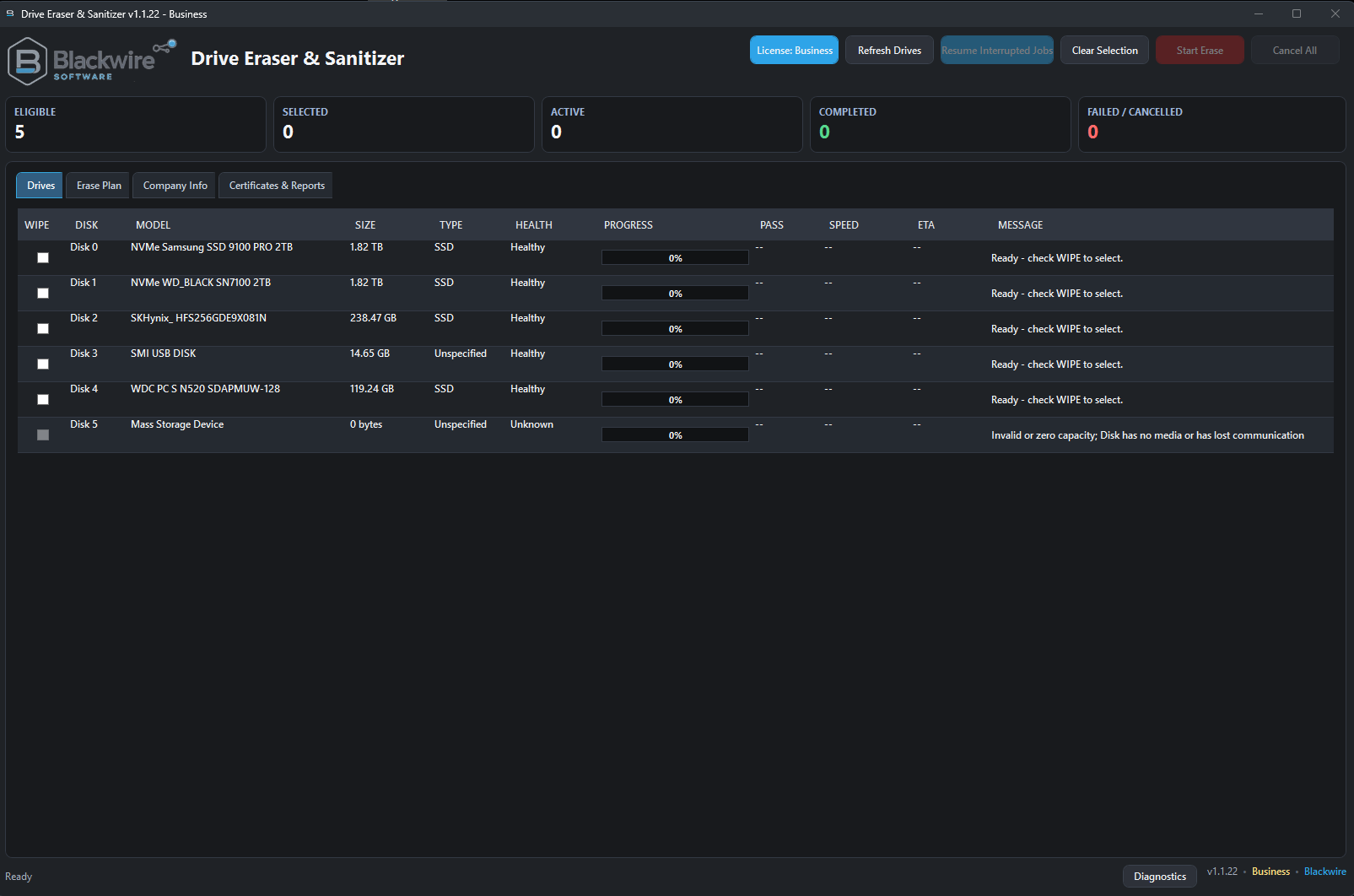
Blackwire Drive Eraser and Sanitizer drive management screen listing detected physical drives
Real application interface with physical-drive detection and status tracking.
NIST-aligned workflowsClear, Purge, Destroy documentation
SSD and NVMe awareConnection-dependent firmware support
Recovery and verificationDurable checkpoints and evidence
Windows x64 installerStandard installed application

Pricing and editions

Choose the edition that fits your use.

Free and Home Pro are for personal, noncommercial use. Business adds commercial licensing, unlimited supported parallel drives, certificates, evidence files, branding, signing, and priority support.

Personal use

Free

$0

No activation required and no limit on the number of personal computers.

  • Approximately 50% software-overwrite speed
  • Firmware erase commands are not slowed
  • Up to 2 drives at once
  • Core erase, verification, recovery, and safety features
  • No certificates or evidence reports
Complete commercial edition
Commercial use

Business

$39.99

For technicians, repair shops, refurbishers, IT departments, MSPs, and organizations.

  • Everything in Home Pro
  • Commercial use allowed
  • Unlimited supported parallel drives
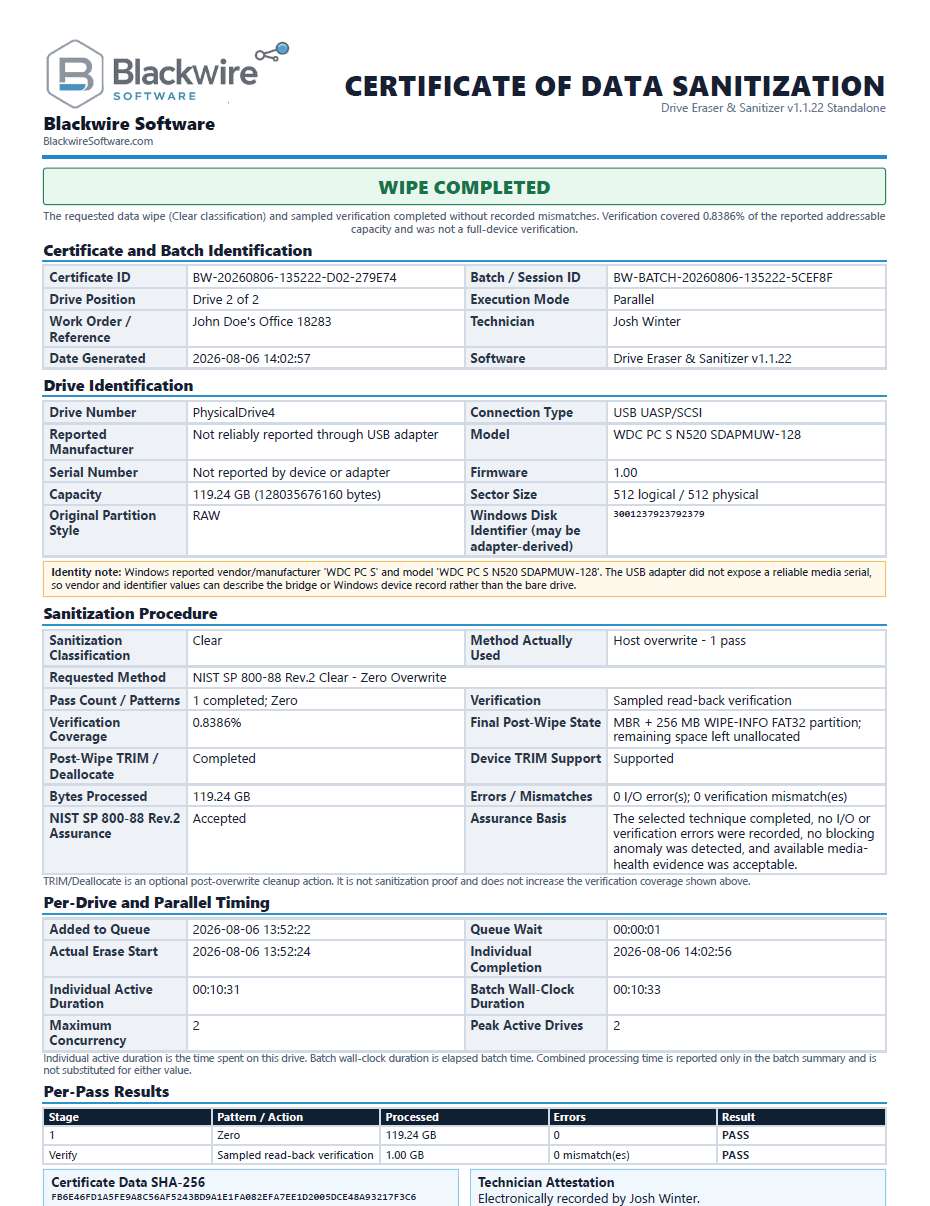
  • PDF and HTML certificates
  • Evidence, verification, and batch reports
  • Company branding, PFX signing, and priority support

Safety is not a paid upgrade

Every edition includes the same drive protections.

Free and Home Pro use the same destructive-operation warnings, drive-identity checks, system-disk blocking, supported-connection rules, interrupted-job safeguards, and controller-result handling as Business.

Review safety features

Complete comparison

See exactly what changes between editions.

The differences are licensing, software-overwrite performance, parallel capacity, reporting, branding, and support—not destructive-operation safety.

FeatureFreeHome ProBusiness
Price$0$9.99$39.99
Intended usePersonal / noncommercialPersonal / noncommercialCommercial and organizational
Commercial useNoNoYes
Activation requiredNoLemon SqueezyLemon Squeezy
Active paid-license computersNot applicable22
Transferable activationNot applicableYesYes
Software-overwrite speedApproximately 50%Full speedFull speed
Parallel drivesUp to 2Up to 3Unlimited supported*
NIST Clear overwriteIncludedIncludedIncluded
Firmware sanitizeWhen supportedWhen supportedWhen supported
NVMe Block EraseApproved native connectionsApproved native connectionsApproved native connections
NVMe Cryptographic Erase candidateEvidence dependentEvidence dependentEvidence dependent
NIST Destroy documentationIncludedIncludedIncluded
VerificationIncludedIncludedIncluded
Interrupted-job recoveryIncludedIncludedIncluded
TRIM / DeallocateWhen supportedWhen supportedWhen supported
Safety protectionsSame protectionsSame protectionsSame protections
PDF certificatesNoNoYes
HTML fallbackNoNoYes
Evidence JSONNoNoYes
Verification JSONNoNoYes
Batch reports and manifestsNoNoYes
Company brandingNoNoYes
Custom certificate IDsNoNoYes
Optional PFX signingNoNoYes
DiagnosticsIncludedIncludedIncluded
SupportStandardStandardPriority

*Subject to the computer, controllers, adapters, and available hardware resources.

Physical drive management

Clear drive identity from selection through completion.

Detected devices, selected targets, active work, and final outcomes stay visible throughout the destructive workflow.

  • Automatic physical-drive detection
  • Arrival and removal detection while no batch is active
  • Eligible, Selected, Active, Completed, and Failed/Cancelled counters
  • Drive number, model, capacity, serial or available identifier, connection type, and status
  • Selections remain visible and easy to verify
  • Parallel or in-order execution
  • Automatic completion tracking
  • Completion sound for successfully erased drives
Active Drive Eraser jobs showing per-drive progress bars, pass numbers, speeds, estimated times, and messages
Per-drive progress, pass, speed, ETA, and completion state.

NIST-aligned sanitization structure

Clear, Purge, Destroy, and evidence-based assurance.

Blackwire uses NIST SP 800-88 Rev.2-aligned workflows and terminology. It is not certified or endorsed by NIST.

01

NIST Clear

Full zero overwrite across the Windows-addressable logical device, with software-overwrite verification options.

02

NIST Purge

Device Firmware Sanitize when supported, native NVMe Block Erase on approved connections, or Cryptographic Erase only when the required encryption and key-sanitization evidence is available.

03

NIST Destroy

Documents an external physical-destruction process. The Windows program does not crush, shred, melt, incinerate, or otherwise physically destroy hardware.

Assurance decision

Accepted, Rejected, Escalate, or External process required.

The application evaluates completion status, controller results, errors, anomalies, verification results, media health information, and available device evidence before presenting an assurance decision.

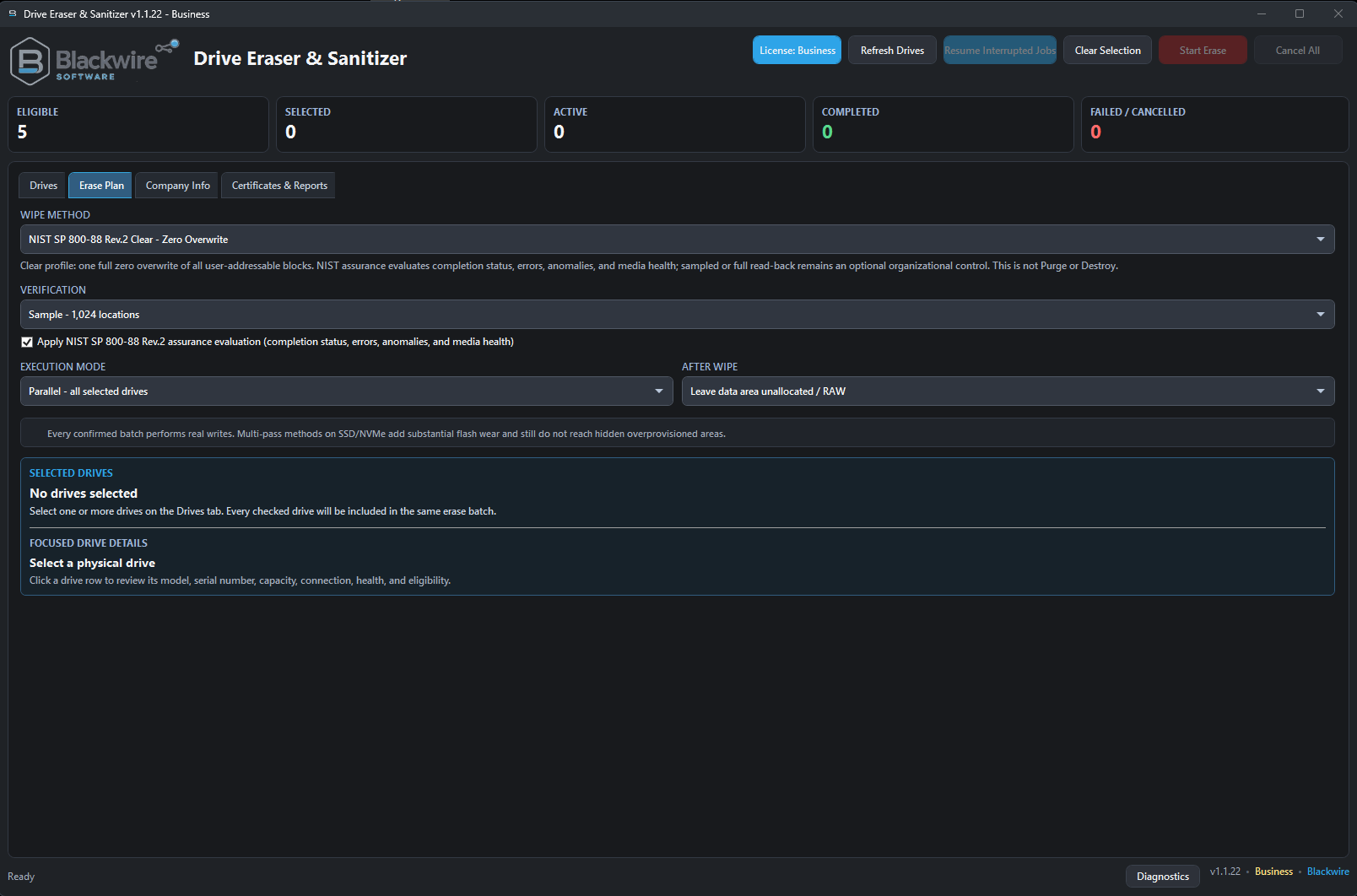
Drive Eraser Erase Plan screen showing NIST method, verification, execution mode, after-wipe options, and eligibility guidance
The Erase Plan separates the requested method, verification, execution mode, post-wipe behavior, and connection-dependent eligibility.

Safety and drive identity

Designed to stop the wrong drive from becoming the target.

Destructive work requires deliberate confirmation and last-moment identity checks before direct physical-drive access begins.

  • Exact typed confirmation phrase before destructive operations
  • Clear Permanent Data Destruction warning
  • Every selected drive displayed before confirmation
  • Revalidation of drive number, capacity, model, serial, and available identifiers before raw access
  • Prevents a disk-number change from redirecting a job
  • Blocks the running Windows system disk and the application or Toolbox host disk
  • Blocks inappropriate firmware commands through USB, RAID, virtual disks, or unsupported connections
  • Labels identifiers that may come from a USB bridge or adapter
  • Unavailable SMART, HPA, DCO, or controller evidence is not treated as proof that a condition is absent
  • Reporting problems cannot overwrite a controller-confirmed firmware result
  • A license change never interrupts an erase already in progress
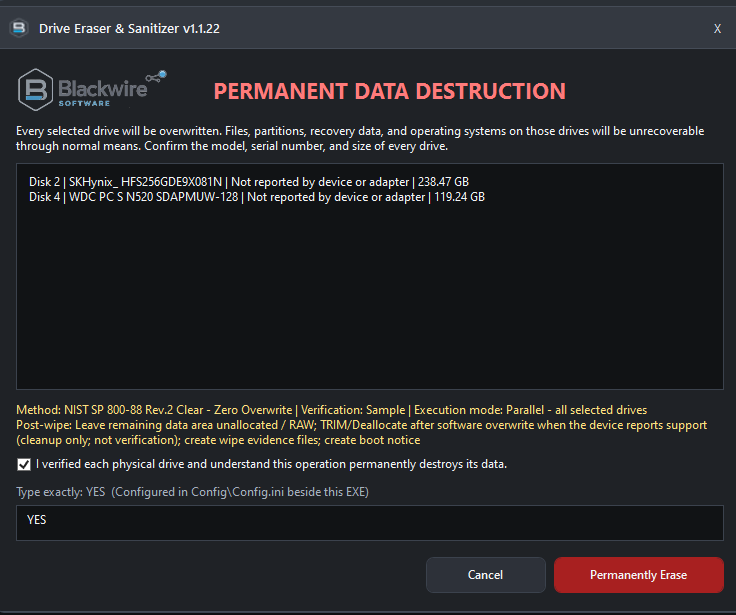
Permanent Data Destruction confirmation dialog listing selected drives and requiring the exact typed confirmation phrase
The final confirmation lists each target and requires the exact configured phrase.

Erase, SSD, NVMe, and verification

Use the best supported method without overstating the result.

The requested method, method actually used, controller response, verification coverage, errors, warnings, and final outcome remain separate and explicit.

A

Software overwrite

Secure host-based overwrite, NIST Clear zero overwrite, per-pass progress, write/read error tracking, retry tracking, and results.

F

Firmware sanitize

Device-default firmware erase or sanitize when the hardware, driver, controller, and native connection support it.

N

NVMe workflows

Native NVMe Block Erase on approved connections and Cryptographic Erase only as an evidence-dependent Purge candidate.

V

Verification

Sampled or full read-back where offered, coverage reporting, mismatch detection, errors, per-pass status, and separate firmware-command results.

SSD and connection awareness

  • SSD-aware operation
  • Optional post-overwrite TRIM/Deallocate when Windows and the device report support
  • TRIM is optional cleanup—not proof of sanitization
  • USB adapters, RAID controllers, virtual disks, and unsupported connections may limit direct firmware commands
  • Host software overwrite remains available when appropriate

Honest verification

  • Sampled read-back does not claim to check the entire drive
  • Full read-back where offered by the selected plan
  • Verification coverage is recorded
  • Interrupted overwrite recovery restarts verification from the beginning
  • Firmware completion remains separate from optional post-command verification or reporting issues

Interrupted-job recovery

Resume supported software-overwrite jobs safely.

Recovery is built around authenticated checkpoints and durable write boundaries—not a blind attempt to continue against whatever disk now has the same number.

01

Authenticated checkpoints

Local checkpoints record supported interrupted overwrite jobs and the flush-confirmed durable offset.

02

Drive revalidation

Drive identity is rechecked before raw writing resumes. A mismatched device is never silently accepted.

03

Deliberate resume

A custom destructive-resume confirmation is required, writing resumes only from durable progress, and verification restarts from the beginning.

Business reporting

Professional certificates and evidence for commercial work.

Business creates customer-ready output without hiding the technical details needed for internal records, audits, troubleshooting, and evidence review.

  • Per-drive report folders
  • Multi-drive summaries and batch manifests
  • PDF certificate with HTML fallback
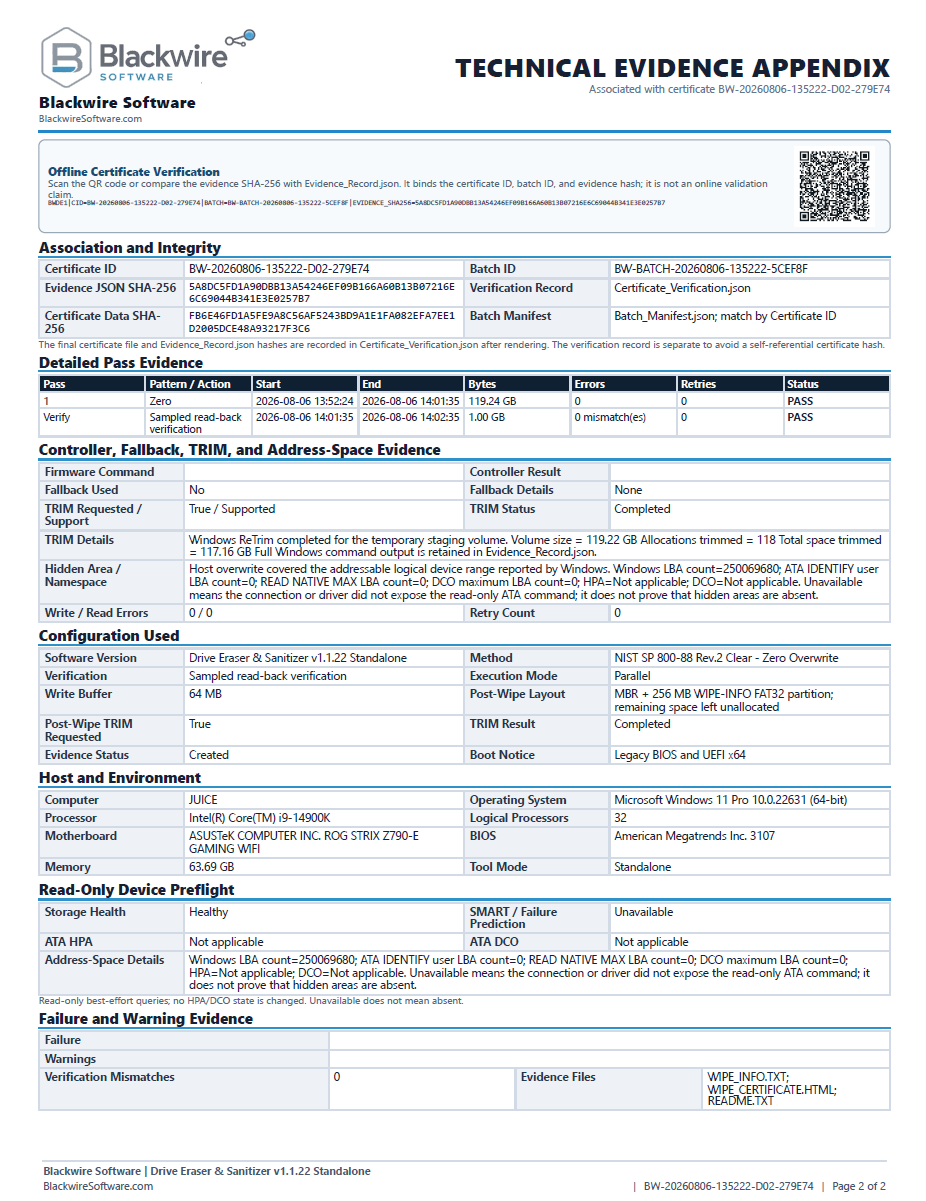
  • Evidence_Record.json and Certificate_Verification.json
  • Certificate IDs and optional custom prefix
  • Company, customer, and technician information
  • Customer logo and Blackwire-powered branding
  • Technical evidence appendix
  • Offline QR evidence binding and SHA-256 change detection
  • Optional PFX certificate signing
  • Parallel and per-drive timing evidence
  • Sanitization, verification, controller, health, error, and warning evidence
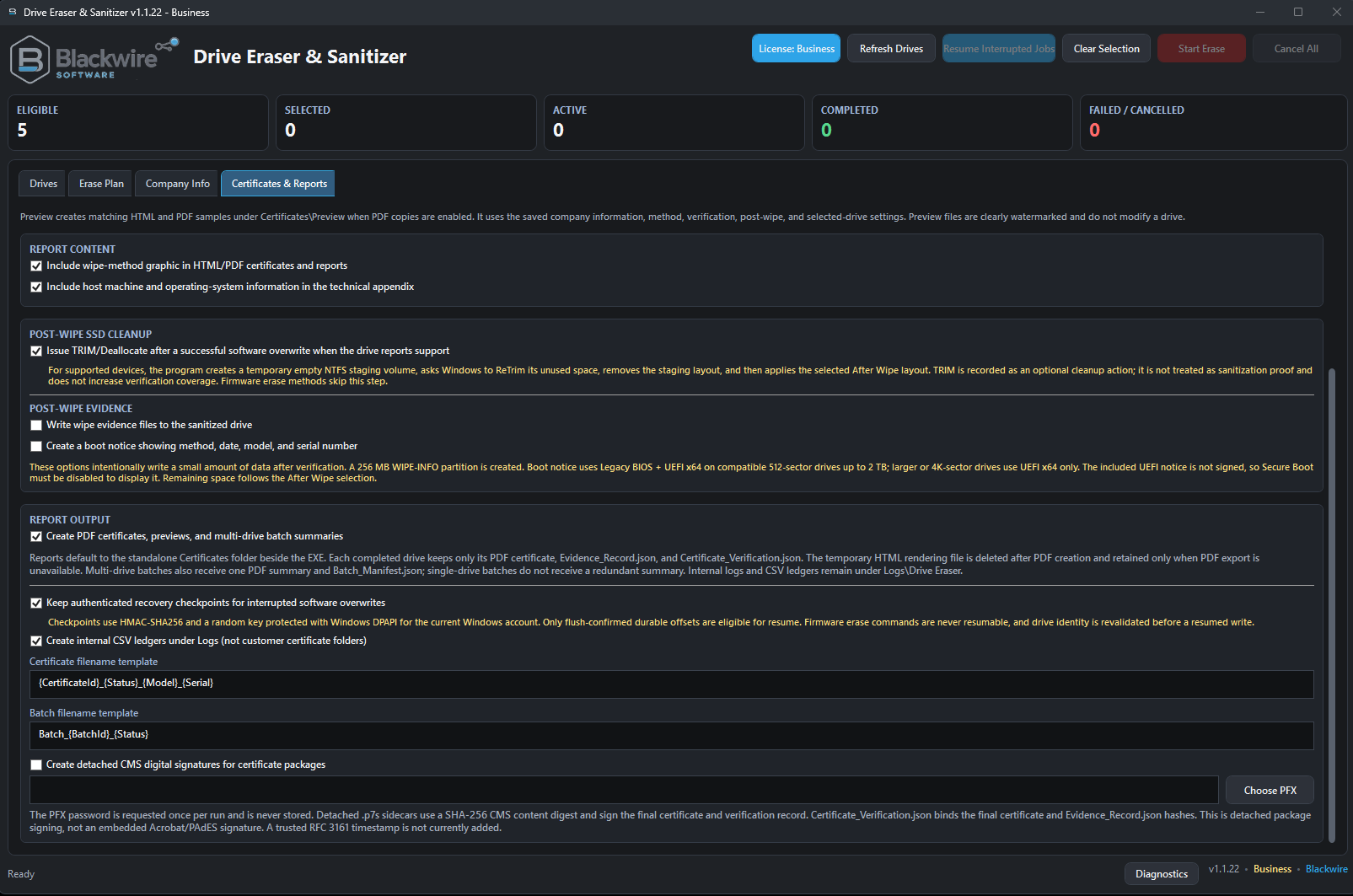
Drive Eraser Certificates and Reports screen with certificate, evidence, post-wipe, and export options
Business certificate, evidence, post-wipe, and export settings.
QR information provides offline evidence binding; it is not an online validation claim. SHA-256 values help detect later file changes.

Windows installation

A standard installed Windows application.

Drive Eraser & Sanitizer is distributed through a Windows x64 installer for Free, Home Pro, and Business. Each edition installs as a normal Windows application with the same core erase engine and safety protections.

Standard Windows installer

  • Windows x64 installer
  • Normal installed-application experience
  • Start menu integration and Windows Apps & features support
  • Same edition features and licensing rules
  • Same erase capabilities, safety protections, and NIST-aligned workflows
  • Administrator privileges required for direct physical-drive access

Installed and maintained normally

  • Installed through the Blackwire Windows setup application
  • Designed for a normal Start menu and desktop workflow
  • Updates can preserve existing settings, licensing state, logs, recovery information, certificates, and company information
  • Uninstall support is provided through Windows
  • Local user data can be preserved during uninstall unless the user chooses to remove it

Paid licensing

Home Pro and Business use Lemon Squeezy license keys with up to two active computers and transferable activation.

Offline grace

Temporary grace supports genuine network or service interruptions. Confirmed disabled, refunded, revoked, expired, or rejected licenses return to Free.

Safe license changes

A license change never interrupts an erase already in progress. Private Lemon Squeezy API keys are never embedded in the customer application.

Diagnostics

A separate Diagnostics Log window provides live technical logging, Copy All, Open Log Folder, persistent session logs, and automatic cleanup of logs older than 30 days.

Post-wipe options

Leave the drive in the state your workflow requires.

Optional evidence content can be created after supported erase and verification workflows without being confused with sanitization proof.

R

RAW or unallocated

Leave the remaining drive area unallocated or RAW after completion.

T

TRIM / Deallocate

Optionally request supported cleanup after software overwrite and verification. TRIM is not proof that the device was sanitized.

W

WIPE-INFO evidence partition

Optionally create WIPE_INFO.TXT, WIPE_CERTIFICATE.HTML, README.TXT, and a compatible boot notice. Secure Boot limits are explained without overstating compatibility.

Frequently asked questions

Answers before you erase a drive.

What is the difference between Free, Home Pro, and Business?

Free provides the core personal-use erase, firmware, verification, recovery, and safety workflows at approximately 50% software-overwrite speed with up to two parallel drives. Home Pro adds full overwrite speed, three parallel drives, and a transferable two-computer personal license. Business allows commercial use, unlimited supported parallel drives, professional reports, evidence, branding, signing, and priority support.

Is the Free edition safe?

Yes. Free includes the same destructive-operation warnings, drive-identity revalidation, protected-disk blocking, connection restrictions, recovery protections, and controller-result handling as the paid editions.

Why is Free software-overwrite speed limited?

The limit differentiates the free personal edition from Home Pro while keeping the same methods and safety protections. It affects host software overwrite only.

Does the speed limit affect firmware sanitize commands?

No. Firmware-driven erase and sanitize commands are not artificially slowed in Free.

Can it erase SSDs and NVMe drives?

Yes, using supported host overwrite and connection-dependent firmware workflows. Direct NVMe or other firmware commands require compatible hardware, drivers, controllers, and approved native connections.

Can it erase the Windows system drive?

No. The actively running Windows system disk is blocked, along with other protected disks the application identifies as unsafe targets.

Does it work through USB adapters?

Host software overwrite may be available, but USB bridges can hide reliable device identity and block direct firmware commands. The program does not claim unsupported firmware results.

What is the difference between Clear, Purge, and Destroy?

Clear uses logical techniques such as a full overwrite. Purge uses supported device-level techniques with stronger resistance to laboratory recovery when the necessary evidence is available. Destroy is an external physical process that the software can document but cannot perform.

Is one overwrite pass enough?

The selected method and assurance decision depend on the media, connection, policy, errors, verification, and evidence. The application reports what was requested and what actually completed rather than claiming that one method fits every device.

Does TRIM prove that an SSD was sanitized?

No. TRIM or Deallocate is optional cleanup and is not treated as sanitization proof.

What happens if the computer loses power during an overwrite?

Supported software-overwrite jobs can use authenticated checkpoints. The drive is revalidated, writing resumes only from a flush-confirmed durable offset, and verification restarts from the beginning.

Can a paid license be moved to another computer?

Yes. Home Pro and Business support two active computers and a Deactivate This Computer option so the license can be transferred.

What happens after a refund or disabled license?

When online validation confirms a disabled, refunded, revoked, expired, or rejected license, the application returns to Free. Any erase already in progress is allowed to finish safely.

Which edition creates certificates and reports?

Business. Free and Home Pro do not create PDF certificates, HTML certificates, evidence JSON, verification JSON, batch reports, or company-branded output.

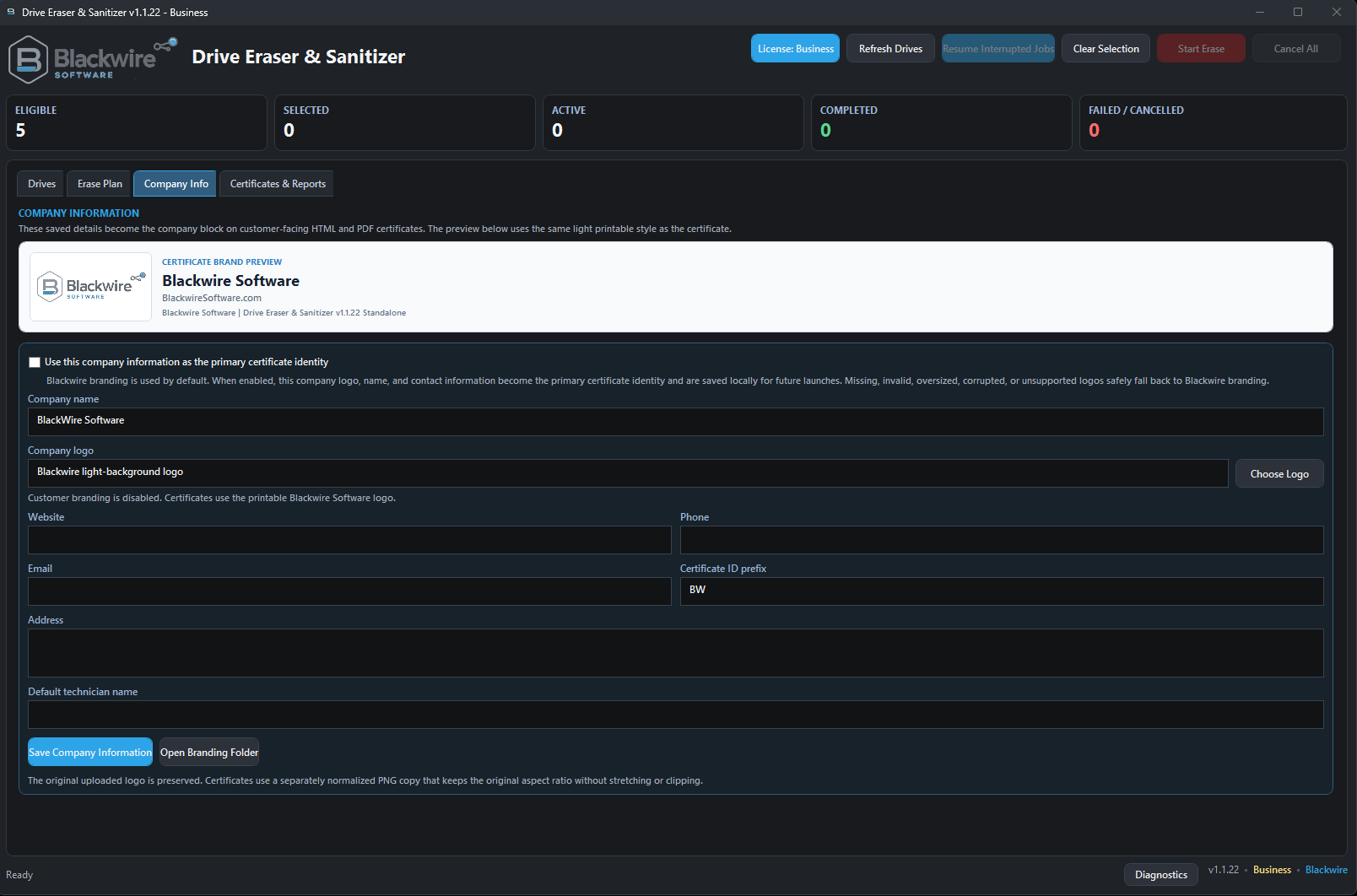
Can Business certificates include my company logo?

Yes. Business supports company and customer information, a company logo, technician information, customer-branded certificates, optional certificate ID prefixes, and Blackwire-powered branding.

Does the program require installation?

Yes. Blackwire Drive Eraser & Sanitizer is distributed as a standard Windows x64 installer. After installation it runs like a normal Windows application and requires administrator privileges for direct physical-drive access.

Is the application digitally signed?

The release page will identify the signing status of the installer and installed application. Business report signing with a customer PFX is a separate optional certificate feature.

Does the application physically destroy a drive?

No. It can document an external NIST Destroy process, but it does not crush, shred, disintegrate, melt, or incinerate hardware.

Download and purchase

Start with Free or choose the edition you need.

Use the official Blackwire Software links below. Every edition is delivered as a standard Windows x64 installer.

Free — $0

Personal and noncommercial use. No activation required.

Home Pro — $9.99

Full performance for personal, noncommercial use.

Business — $39.99

Complete commercial edition with certificates and evidence.