Windows integration
Installs under Program Files with a Start Menu shortcut, optional Desktop shortcut, Apps & Features entry, Blackwire icon, version information, and a normal uninstaller.

Blackwire Artifact Signing Manager v0.2.0 gives developers, small software companies, IT teams, technicians, and release teams a Windows interface for Microsoft Artifact Signing.
Install. Connect. Discover. Sign. Verify.
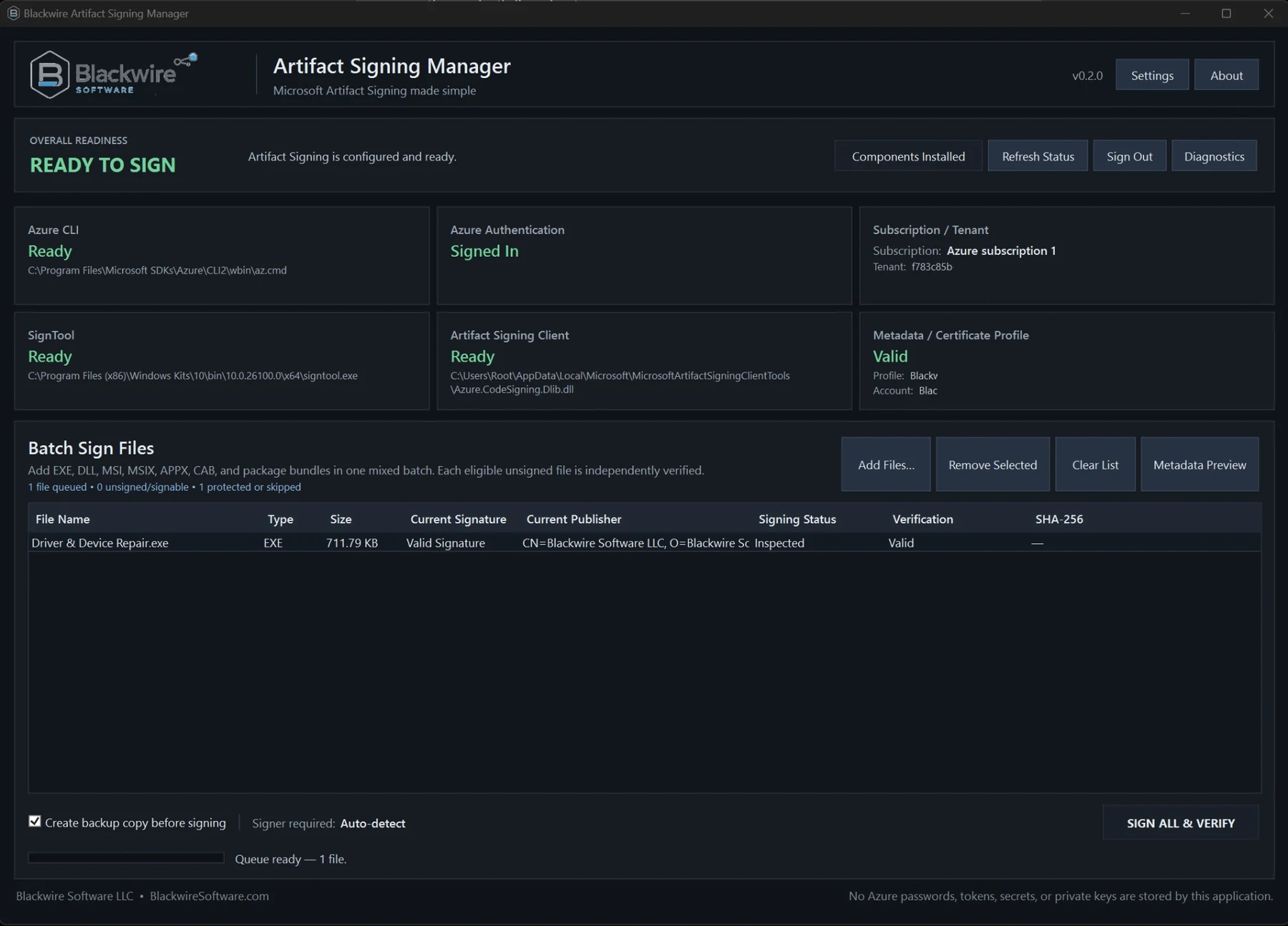
Current product status
This is being built as a normal installed and licensed Windows application, not a portable EXE or USB utility. Public checkout is not available yet.
Installation experience
The finished product installs through the normal Blackwire setup and licensing process. You should not have to maintain a folder beside the EXE or move the app between computers by hand.
Installs under Program Files with a Start Menu shortcut, optional Desktop shortcut, Apps & Features entry, Blackwire icon, version information, and a normal uninstaller.
A Blackwire license activates the application itself. It does not grant access to Microsoft Artifact Signing or bypass Microsoft's requirements.
Updates install over the existing version so you do not have to rebuild the signing setup for every Blackwire release.
Settings, diagnostics, signing history, reports, backups, and other app data are kept in Blackwire-managed application-data locations instead of beside the executable.
From install to first signature
You should not have to hunt through Azure Portal for every identifier or rebuild a long signing command every time you ship a release.
Microsoft component setup
Artifact Signing Manager checks the local signing setup and points out the pieces that still need attention.
When required Microsoft tooling is unavailable, Blackwire can assist with installing or locating components such as:
Azure.CodeSigning.Dlib.dllAfter Microsoft authentication, Blackwire can discover and organize available customer configuration:
Security and privacy
The app works with Microsoft's supported authentication and signing services without asking you to hand Blackwire an Azure password or private signing key.
The app can remember the non-secret settings needed to find and use your selected Artifact Signing environment.
Microsoft handles the account authentication, and Microsoft Artifact Signing performs the signing operation on Microsoft's infrastructure.
In short: the app can remember normal configuration. It does not store Azure passwords, private signing keys, client secrets, or manually captured access tokens.
Customer configuration
Blackwire's own Azure subscription, tenant, Artifact Signing account, certificate profile, and internal signing settings are not built into customer releases.
Each installation keeps the configuration for that customer's own Microsoft Artifact Signing environment.
Saved configuration lives in Blackwire-managed application-data locations, not in a portable Config folder beside the EXE.
Buttons such as Open Diagnostics, Open Reports, Open Backups, Export History, and Open Configuration Location give you direct access without having to browse through application folders.
Batch signing
Add multiple supported Windows files to one queue. Each file is inspected, signed, verified, and reported separately.
The app focuses on release formats covered by the tested Microsoft Artifact Signing workflow; it does not claim that every possible file type is supported.
Signing and verification
After Microsoft signs the file, Artifact Signing Manager checks the result instead of stopping at the command exit code.
Inspect the existing Authenticode state before signing and protect already-signed or third-party artifacts from silent replacement.
Submit eligible artifacts through Microsoft's supported signing client and Artifact Signing infrastructure using SHA-256 signing and trusted timestamping.
Run SignTool and Windows Authenticode checks, confirm signature validity, verify the expected publisher, and confirm trusted timestamp information.
Calculate SHA-256 only after signing is complete so hashes represent the final signed artifacts rather than pre-signing files.
Diagnostics
Diagnostics are there when Microsoft tooling, authentication, prerequisites, signing, or verification need a closer look.
The app lets you view, copy, save, export, and clear diagnostic information. Raw output stays out of the main dashboard unless it needs your attention.
Licensed Blackwire product
Artifact Signing Manager uses normal Blackwire activation. That license does not create a Microsoft Artifact Signing account, grant Azure permissions, or bypass Microsoft requirements.
Who it is for
Sign Windows applications and releases using Microsoft's identity-backed service without reconstructing SignTool commands for every build.
Standardize a repeatable signing workflow around the company's own Microsoft Artifact Signing environment.
Sign internal utilities, deployment packages, support tools, installers, and other Windows binaries that require a verifiable release process.
Process multi-file release sets with per-artifact inspection, signing, verification, timestamp checks, backups, diagnostics, and final hashes.
What it does not do
Frequently asked questions
Blackwire Artifact Signing Manager is a normal installed Windows application. It uses a Blackwire installer, integrates with Windows Apps & Features, supports normal upgrades and uninstallation, and uses product licensing and activation.
The product is not designed as a portable EXE. Install and activate Blackwire Artifact Signing Manager normally on the Windows computer where it will be used, subject to the product's licensing terms.
No. Customer-specific Azure and Artifact Signing configuration is maintained separately by the installed application. Blackwire's own internal Artifact Signing configuration is not embedded into customer releases.
The application can store normal configuration and operational information such as the selected subscription, tenant ID, Artifact Signing account, certificate profile, expected publisher, endpoint, settings, diagnostics, reports, signing history, and licensing state. Blackwire Artifact Signing Manager does not store the customer's Azure password, private signing key, client secret, or manually captured Azure access tokens.
No. Microsoft Artifact Signing provides the identity-backed signing service. Blackwire manages and simplifies the workflow around the customer's eligible Microsoft environment.
Yes. The customer still needs an eligible Microsoft Artifact Signing environment and the necessary permissions. Blackwire does not provide or bypass those Microsoft requirements.
Yes. The application supports batch signing for supported Windows release artifacts while tracking and verifying each file independently.
Yes. The workflow is designed to verify Authenticode status, the expected publisher, and trusted timestamp information before treating an artifact as signed and verified.
Release status
This licensed Windows product is still in development. Pricing, license limits, and checkout terms have not been published yet, and customers will still need an eligible Microsoft Artifact Signing environment.