Blackwire Omada Recovery Migrator
WindowsOffline / Recovery migrationLate Alpha / In Progress

Blackwire Omada Recovery Migrator — Offline Controller Recovery & Migration

Omada already has Site Migration for normal supported online moves. Blackwire Omada Recovery Migrator is for the harder cases: the old controller is unavailable, failed, or cannot participate; only a usable backup remains; the source and destination do not have a workable native path; or the normal migration workflow cannot complete the job.

The current build works from a saved source controller or Fusion configuration together with a fresh backup from the actual destination Fusion. The source controller does not need to be online for the recovery workflow when a usable source backup is available.

Blackwire reviews compatibility, protects destination-owned Fusion state, generates a destination-specific restore, and keeps validation in front of the technician before the file is used on hardware. Beta has not started and there is no public release date.

View recovery workflowLate Alpha / In Progress
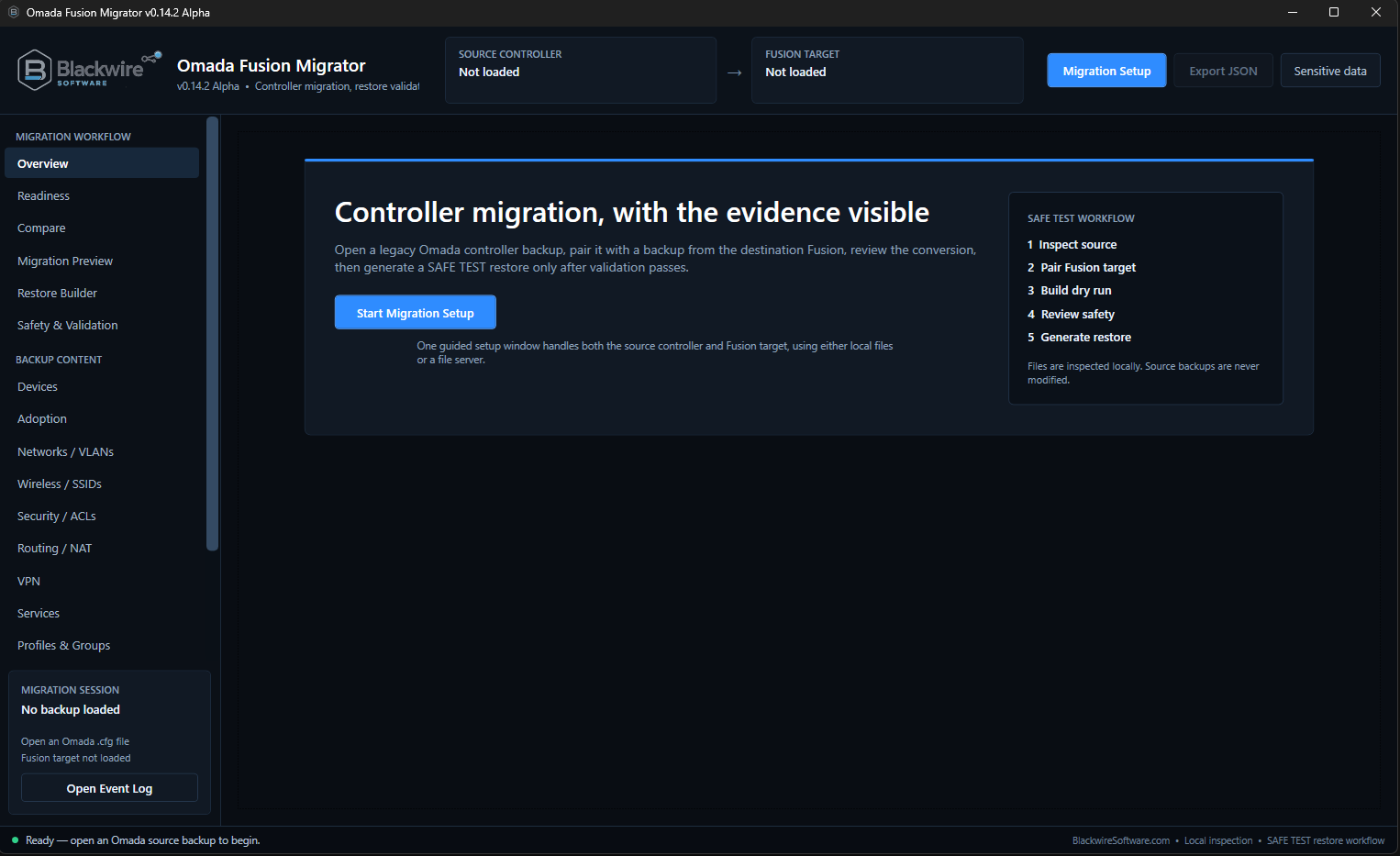
Blackwire Omada Recovery Migrator offline recovery overview before source and destination backup selection
Offline / recovery starting point — Start with the source backup that is still available and a fresh backup from the Fusion that will receive the recovery. The old controller does not have to participate in the workflow.
Native migration firstUse Omada Site Migration for normal supported online moves
Offline / recovery casesBuilt for backups, failed controllers, and unavailable sources
Compatibility reviewSource and destination differences are checked before generation
Real hardware restoresOC200, OC220, OC300, and Fusion generation testing

Where Blackwire fits

It is not meant to replace Omada's normal Site Migration workflow.

If the source controller is online, supported, and able to complete a normal Site Migration, use the native Omada process. Blackwire is being developed for the cases that are left over when that path is not available or not enough.

Old controller is gone

The original controller failed, was removed, or is otherwise unavailable, but a usable controller backup still exists.

No workable live path

The source and destination combination does not have a native online migration path that can complete the move the way the technician needs.

Recovery needs review

The technician needs to inspect what can be carried forward, what belongs to the new Fusion, and what needs to be held or handled manually.

Destination must stay itself

The replacement Fusion keeps ownership of its hardware identity, ports, controller login, and other target-specific state while the recoverable source configuration is brought forward.

Simple rule: if Omada's supported Site Migration works for the job, use it. Blackwire is for recovery, offline, and compatibility cases where the old controller cannot participate or the native path cannot finish the move.

What it is

Recover the source configuration from backup and build it for the Fusion that will actually receive it.

Blackwire treats this as a backup-to-destination recovery job, not as a second version of a normal online controller handoff.

The technician loads the saved source controller or Fusion configuration and pairs it with a fresh backup from the actual destination Fusion.

From there, Blackwire reviews compatibility, shows what can be recovered, identifies destination-owned information that must stay with the replacement Fusion, and validates the result before a restore is saved.

This is especially useful when the original controller is no longer available to log into or participate in a live migration. Fusion-to-Fusion recovery and compatibility work is active too, including moves between different Fusion hardware generations.
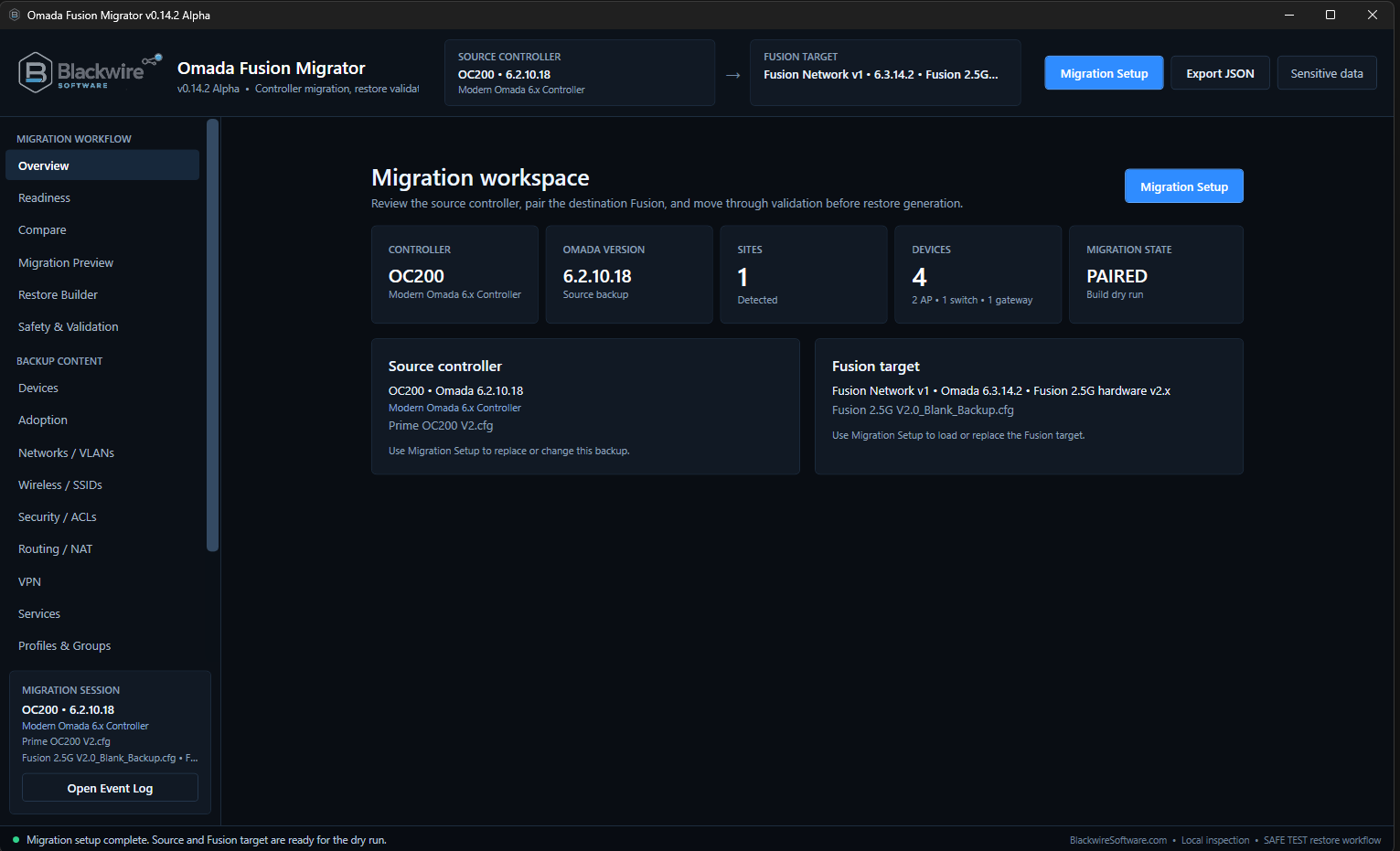
Blackwire Omada Recovery Migrator recovery workspace with saved OC200 source backup and destination Fusion backup loaded
Recovery workspace — The saved source configuration and destination Fusion backup stay visible together. The source controller itself does not have to be online for this backup-based workflow.
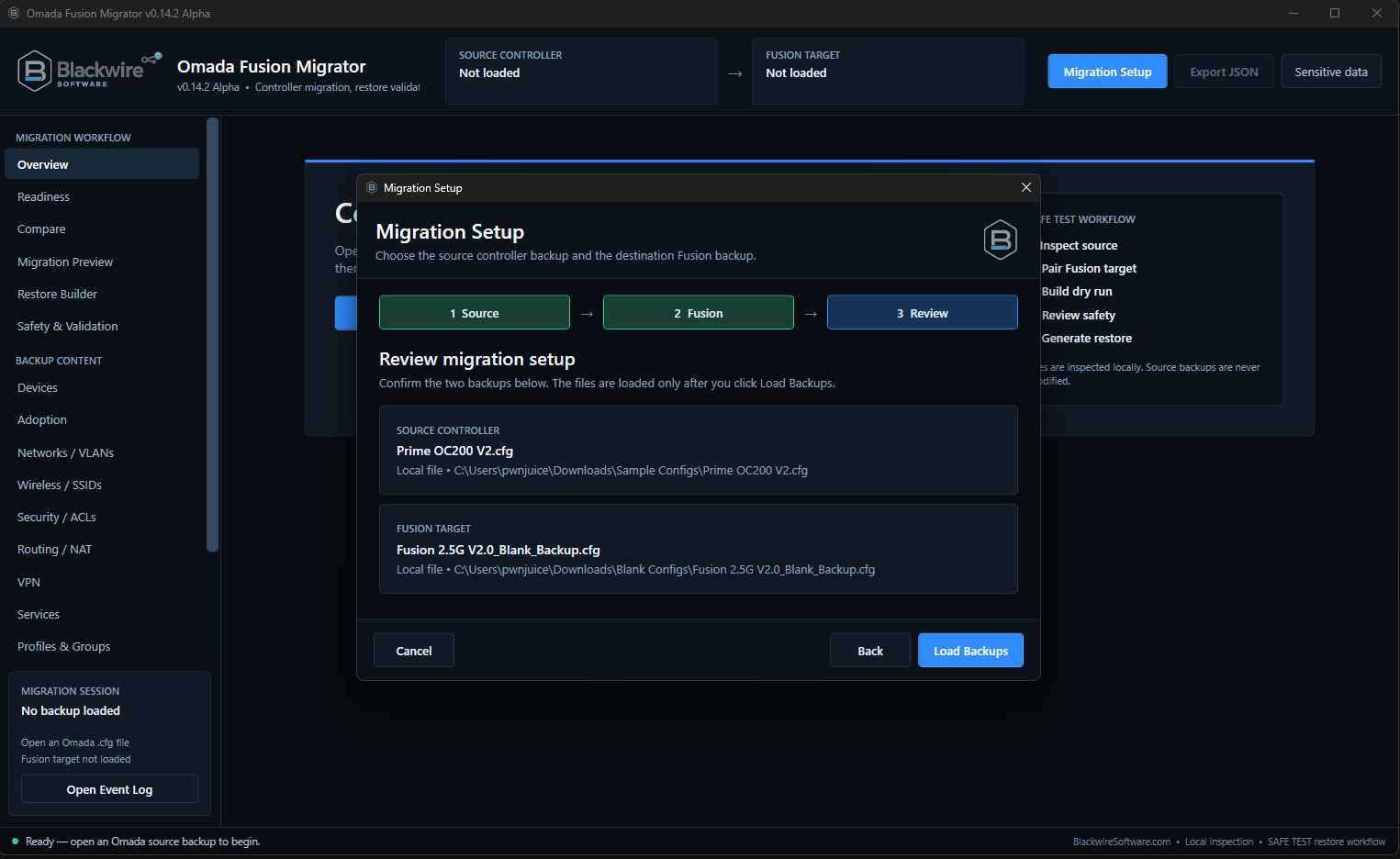
Blackwire Omada Recovery Migrator recovery setup review showing saved source controller backup and fresh destination Fusion backup
Recovery Setup review — Confirm the exact source backup being recovered and the fresh backup from the destination Fusion before any compatibility or generation work begins.

Hardware-tested recovery results

The test matrix is built around real restores, not just generated files.

These results show where the offline/destination-specific approach has survived real Fusion restores. They are combination-specific development results, not a claim that every firmware version, backup, or network design is supported.

Recovery / migration pathStatusWhat the hardware test proved
OC200 V1 → Fusion 2.5G V2-familyHardware validatedController configuration restored successfully from backup. The destination Fusion kept its own hardware identity and local web login. Managed devices still require post-restore trust to be re-established.
OC200 V2 → Fusion 2.5G V1-familyHardware validatedController configuration restored successfully with the destination Fusion remaining owner of its hardware identity and local login. Managed devices still require re-adoption/takeover.
OC220 6.2.14.12 → Fusion 2.5G V1-family 6.3.14.1Hardware validatedA complete OC220 controller configuration restored successfully to Fusion V1-family hardware while preserving destination-owned Fusion identity and login state.
OC220 6.2.14.12 → Fusion 2.5G V2-family 6.3.14.2Hardware validatedThe same complete OC220 source backup also restored successfully to Fusion V2-family hardware with the tested source configuration retained.
OC300 6.2.14.11 → Fusion 2.5G V1-family 6.3.14.1Hardware validatedController configuration restored successfully. The destination Fusion remained owner of its hardware identity and local web login, while managed APs and switches still require post-restore trust to be re-established.
OC300 6.2.14.11 → Fusion 2.5G V2-family 6.3.14.2Hardware validatedPhysical restore testing successfully moved the tested OC300 configuration to Fusion V2-family hardware, including ACL, WAN, VPN, DDNS, routing, and other validated configuration areas. Managed devices still require post-restore re-adoption/takeover.
Fusion 2.5G V1-family → V2-familyHardware validatedConfiguration migration between Fusion hardware generations restored successfully. Native post-restore device takeover has also been physically proven in Fusion-to-Fusion testing.
A path is not treated as proven just because the generated file looks correct. Hardware validation means the migration survived an actual Fusion restore in the tested setup.

Hardware Validated

OC200 → Fusion V1-family and V2-family

Physical testing has successfully recovered OC200 configurations across both Fusion 2.5G hardware families in the current test program: OC200 V1 → Fusion V2-family and OC200 V2 → Fusion V1-family.

In both tests, the controller configuration restored successfully while the destination Fusion kept ownership of its own hardware identity and local web login. The source OC administrator was not transplanted as the Fusion login.

What the OC200 hardware tests proved

  • OC200 V1 → Fusion V2-family restored successfully
  • OC200 V2 → Fusion V1-family restored successfully
  • Destination Fusion hardware identity remained target-owned
  • Destination Fusion local login remained in use after restore
  • Controller configuration recovery and managed-device trust are separate

Existing APs and switches still require post-restore trust to be re-established.

Hardware Validated

OC220 → Fusion V1-family and V2-family

Physical testing has successfully recovered a complete OC220 6.2.14.12 controller configuration onto both Fusion 2.5G hardware families in the current test program.

In both tests, the source configuration survived while the destination Fusion retained ownership of its own controller identity, site identity, built-in Fusion gateway, local administrator/IAM state, and Fusion-specific hardware information.

What was in the OC220 test source

  • 8 LAN/VLAN networks
  • 7 LAN profiles
  • 6 wireless SSIDs
  • 3 IP groups
  • 7 ACLs
  • 2 VPN definitions and 1 VPN user
  • 2 port-forward rules
  • 11 DHCP reservations
  • 4 AP records and 1 switch record

Both generated restores retained those tested configuration counts.

Hardware Validated

OC300 → Fusion V1-family and V2-family

Physical testing has successfully recovered an OC300 6.2.14.11 controller configuration onto both Fusion 2.5G hardware families in the current test program.

The tested configuration restored while the destination Fusion remained owner of its own hardware/controller identity, built-in Fusion gateway, local login, and Fusion-specific hardware information. Managed-device trust remains a separate post-restore step.

What was in the main OC300 test source

  • 3 WAN connections
  • 13 LAN/VLAN networks
  • 4 DHCP reservations
  • 5 wireless SSIDs
  • 10 ACLs
  • 5 VPN definitions, including WireGuard and SSL VPN testing
  • 2 DDNS records
  • 2 port-forward rules
  • 1 policy-routing rule
  • 10 AP records and 6 switch records

The hardware-tested restore retained the tested recovered configuration while keeping the Fusion hardware identity intact.

Configuration recovery and device trust are separate. Across the tested OC200, OC220, and OC300 → Fusion paths, the controller configuration restored successfully while existing APs and switches still require the destination controller to re-establish trust after restore. Blackwire treats that as a separate post-restore takeover step, not as a failed recovery.

Validation snapshot

OC200, OC220, and OC300 now have physical Fusion restore results.

The test matrix includes successful restore evidence from OC200, OC220, OC300, both Fusion 2.5G hardware families, and Fusion generation-to-generation recovery/migration.
HARDWARE VALIDATEDOC200 V1 → Fusion V2, OC200 V2 → Fusion V1, OC220 → Fusion V1, OC220 → Fusion V2, OC300 → Fusion V1, OC300 → Fusion V2, and Fusion V1 → Fusion V2.
COMBINATION-SPECIFICThese results apply to the hardware, firmware, backups, and configurations that were physically tested. They do not mean every OC200, OC220, OC300, or Fusion combination is universally supported.
STILL ACTIVE TESTINGAutomated OC→Fusion takeover, more firmware/hardware combinations, downgrade/cross-version work, unusual WAN layouts, additional VPN/ACL cases, and larger environments.
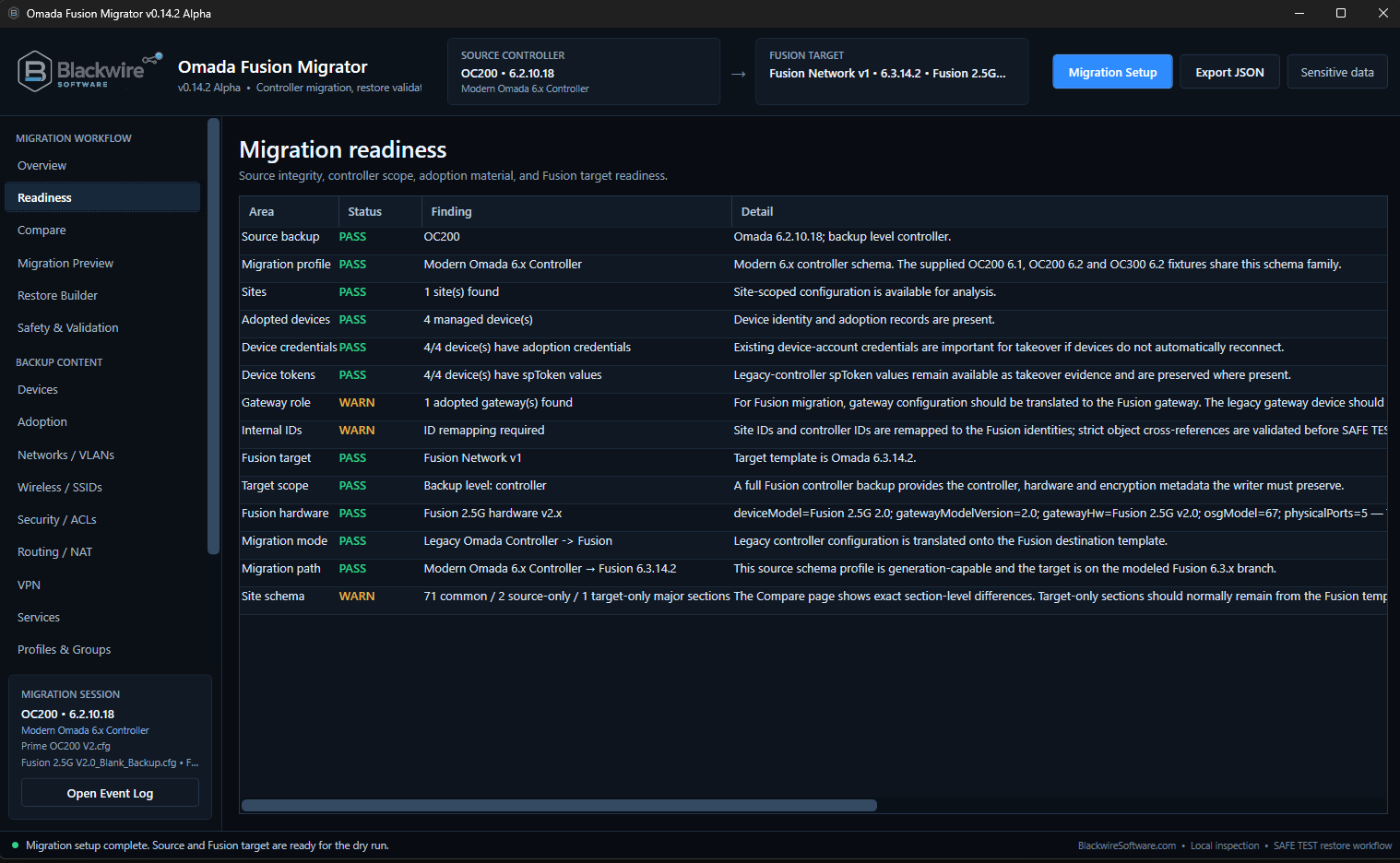
Blackwire Omada Recovery Migrator Recovery Readiness screen showing PASS and WARN preflight findings for an offline OC200 to Fusion recovery
Recovery Readiness — The preflight checks the saved source, the destination Fusion, the recovery path, hardware family, device material, and other conditions before the technician moves deeper into the job.
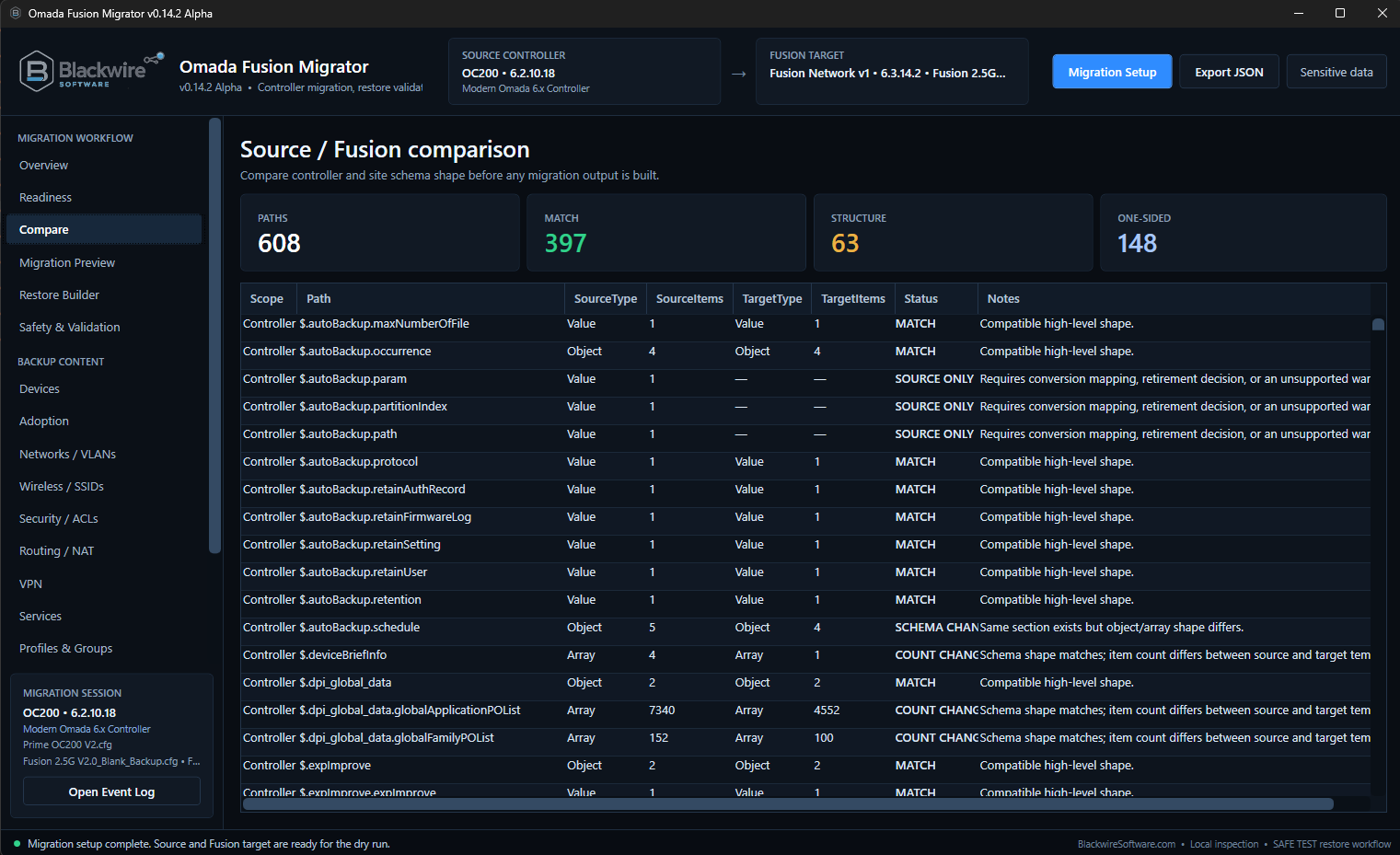
Blackwire Omada Recovery Migrator Source Backup and Fusion comparison screen showing recovered source and destination configuration differences
Source Backup / Fusion comparison — Compare the recovered source configuration with the actual destination Fusion before generation so differences are reviewed instead of guessed.

Current development progress

What the current recovery build is actively carrying forward and validating.

Coverage is broad now, but it is still conditional. Blackwire is designed to hold or block a setting when it cannot safely represent it on the selected destination instead of silently guessing.
  • LANs and VLANs
  • DHCP configuration
  • Wireless networks and SSIDs
  • Network and switch profiles
  • Managed AP and switch records
  • IP groups
  • ACLs and security configuration where a safe Fusion representation is known
  • WAN and Multi-WAN mapping
  • Port forwarding and NAT where validated
  • DDNS
  • VPN configuration
  • VPN certificates and imported configuration material
  • VPN users
  • WireGuard where compatible
  • Routing-related configuration where safely supported
  • Controller and site configuration
  • Destination-specific restore generation
  • Post-generation verification
  • Local-file workflows
  • Supported file-server workflows
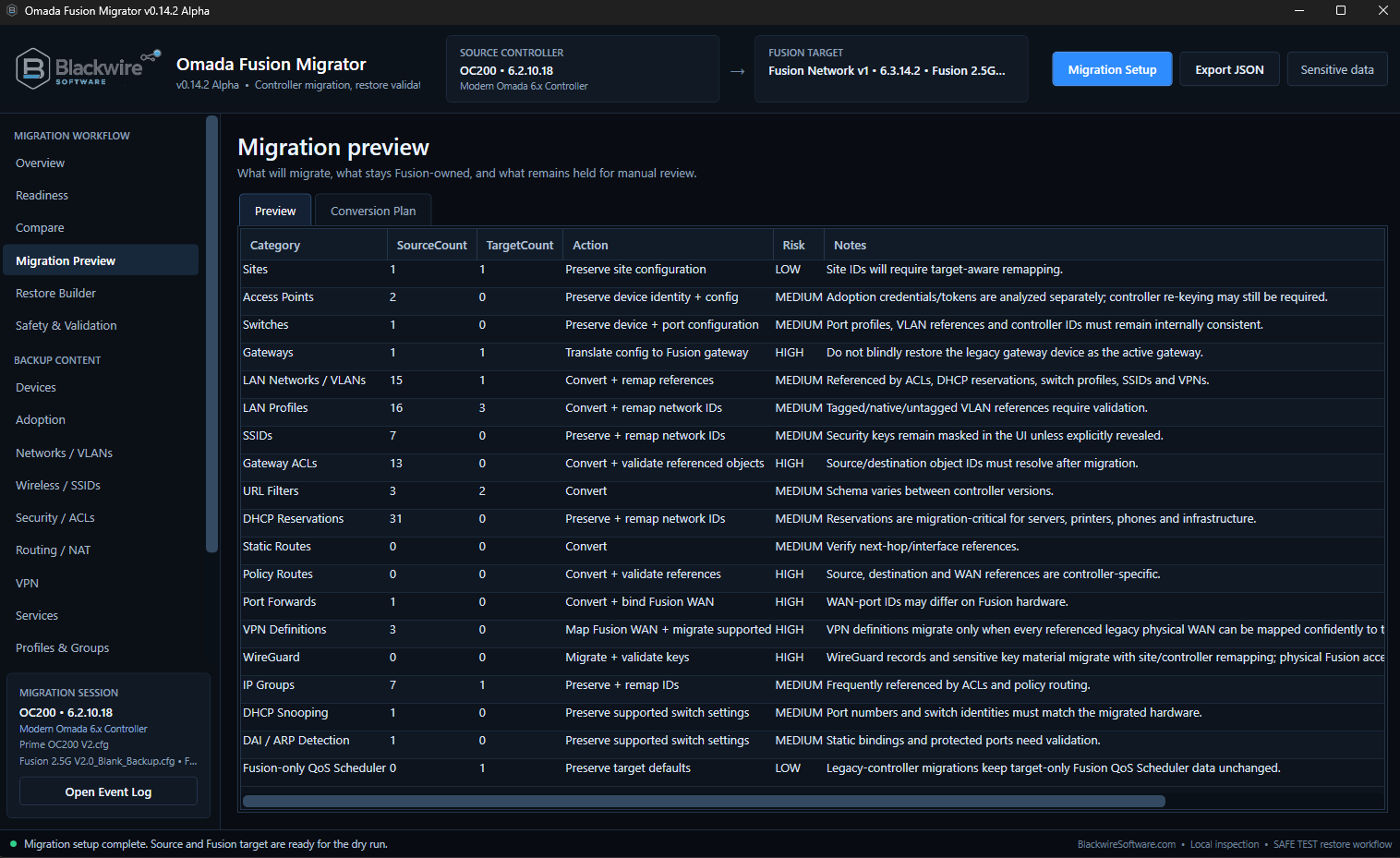
Blackwire Omada Recovery Migrator Recovery Preview showing recovered configuration categories, source and target counts, planned action, risk, and notes
Recovery Preview — Turn the saved source backup into a technician-readable plan: what can move, what belongs to the destination Fusion, and what still needs review.
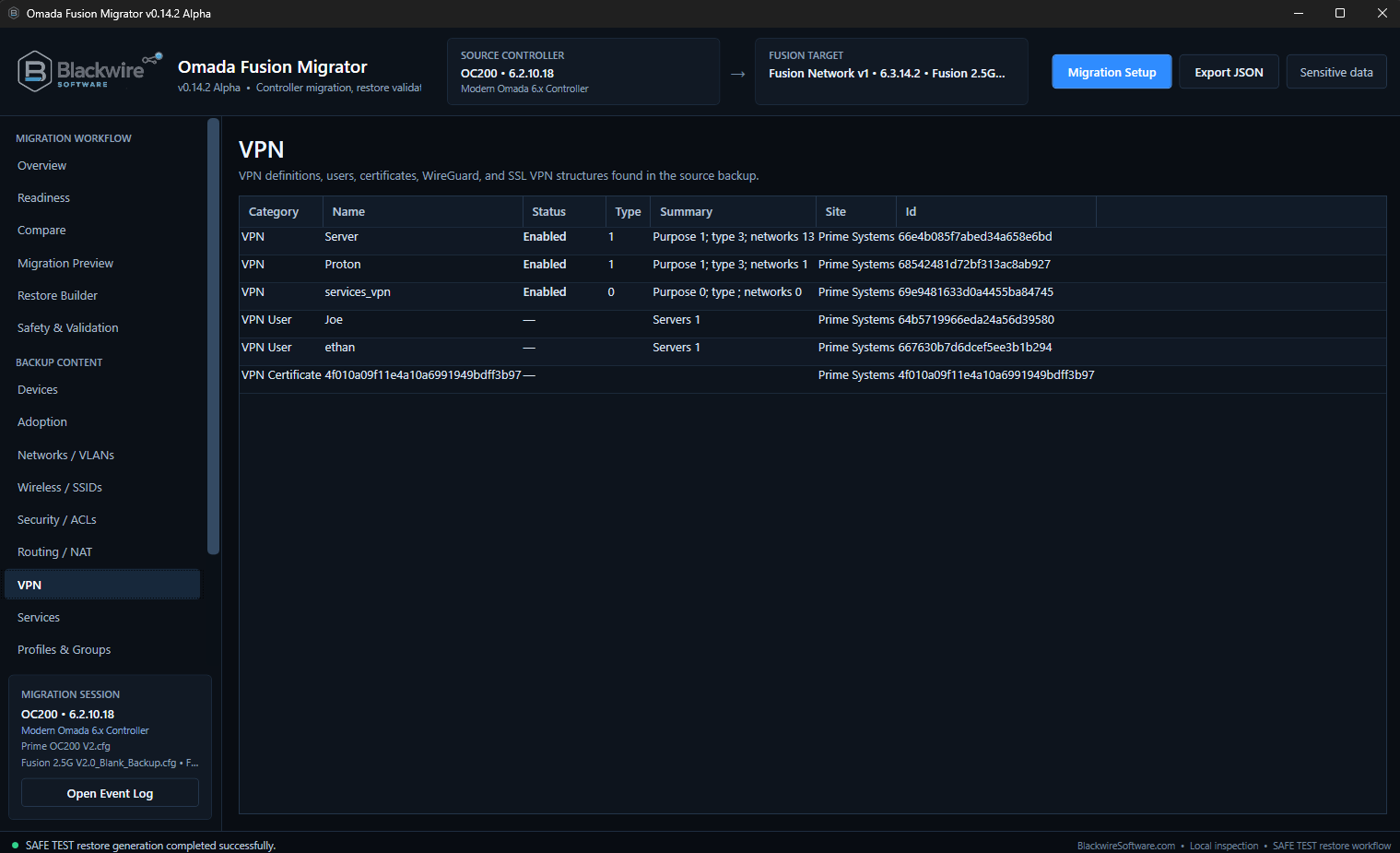
Blackwire Omada Recovery Migrator VPN recovery review showing VPN definitions, VPN users, and certificate records found in the source backup
VPN recovery review — Inventory the VPN-related configuration found in the source backup before deciding what can be carried into the replacement Fusion.
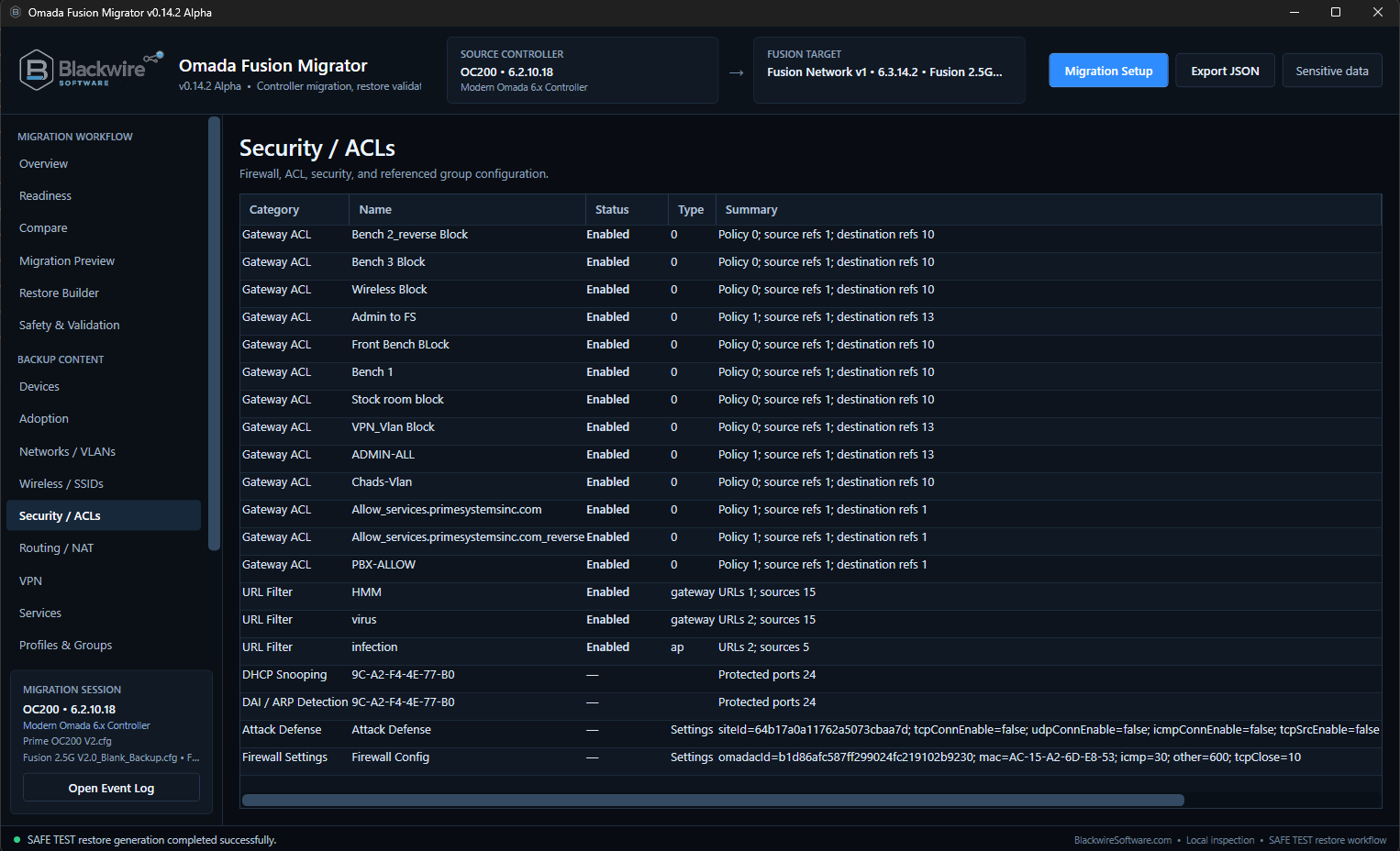
Blackwire Omada Recovery Migrator Security and ACL recovery review showing gateway ACLs, URL filters, and security settings recovered from the source backup
Security / ACL recovery review — Recovered security rules get their own review area so held or unsupported items are visible before the replacement Fusion is restored.
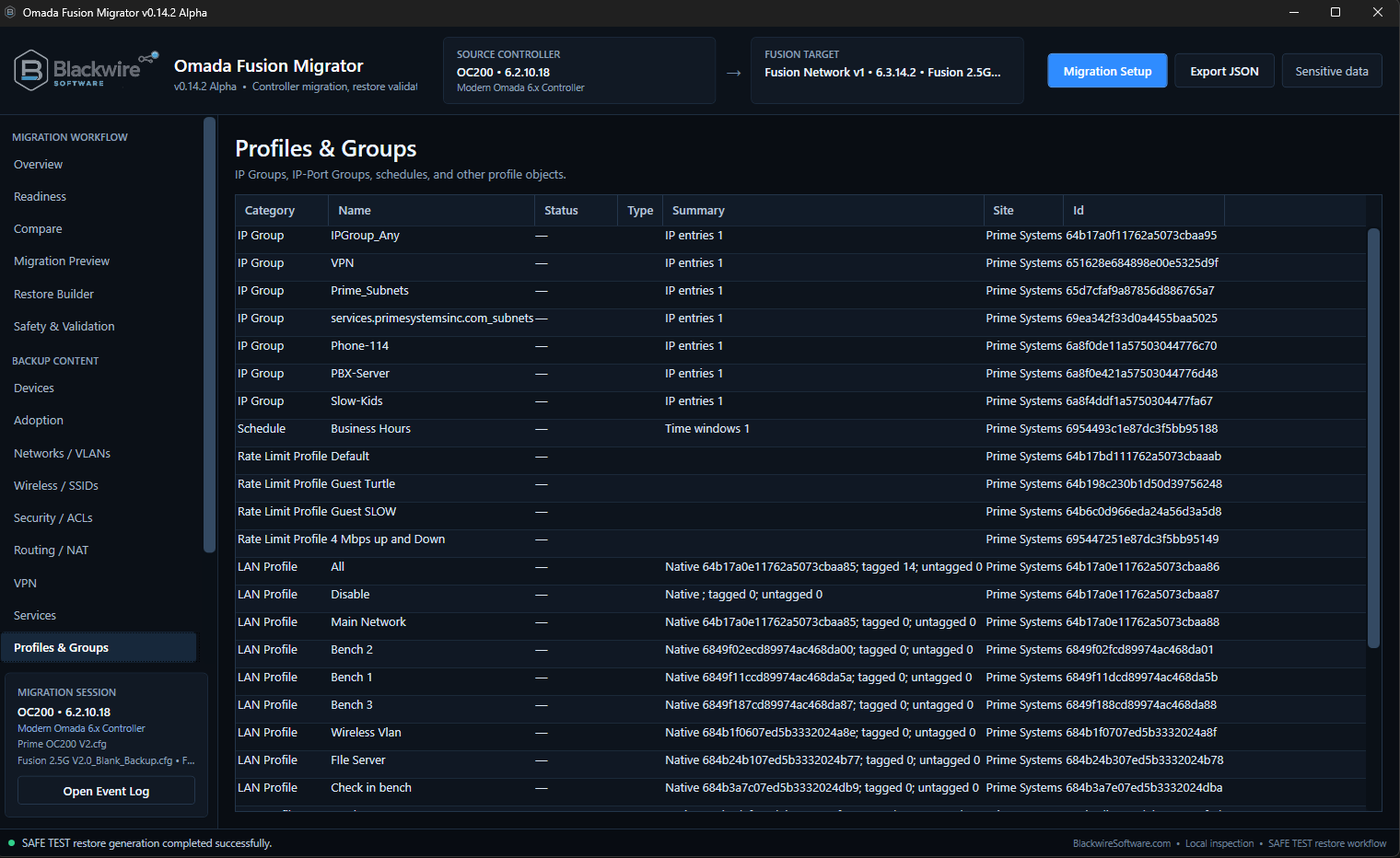
Blackwire Omada Recovery Migrator Profiles and Groups recovery review showing IP groups, schedules, rate limit profiles, and LAN profiles recovered from the source backup
Profiles & Groups recovery review — Supporting objects from the source backup stay visible so the technician can check the dependencies that recovered rules and networks rely on.

After the restore

Recovering the controller configuration does not automatically transfer AP and switch trust.

Physical testing has shown this same distinction across OC200 → Fusion, OC220 → Fusion, OC300 → Fusion, and Fusion V1 → Fusion V2 work.

Configuration can be recovered while device trust still belongs to the old controller.

In these tests, the network configuration could restore correctly while existing managed APs and switches initially reported that they were managed by another controller.

That points to the device/controller trust and adoption process, not a failed recovery of the network configuration.

Takeover happens after the restore.

The current development direction uses Omada's own adoption process so the replacement Fusion can establish its own device trust after the recovered configuration has been restored.

Fusion-to-Fusion proof testing has already moved test devices from a managed-by-another-controller state into configuring/connected state. Automated OC→Fusion takeover is still waiting on its dedicated physical validation before it is enabled generally.

Destination Fusion safety

The replacement Fusion stays the owner of its login and hardware identity.

That matters even more in a recovery job because the old controller may be gone and the replacement controller has to remain accessible after restore.

Use the login that belongs to the destination Fusion.

On the tested OC200, OC220, and OC300 → Fusion restores, the destination Fusion continued to use the local web-login credentials that were configured on that Fusion before the recovery.

The source OC controller local administrator is not transplanted as the Fusion web login. The Generate workflow makes the technician verify the destination login before generation so post-restore access is explicit.

Build against the Fusion that will actually receive the restore.

Testing has shown that Fusion hardware generations are not interchangeable at the backup level. A fresh backup from the exact destination Fusion gives the recovery the target-specific context it needs.

Blackwire protects destination-owned information such as gateway identity, controller and hardware identity, physical port identity, Fusion-specific capabilities, and the destination administrator/login state.
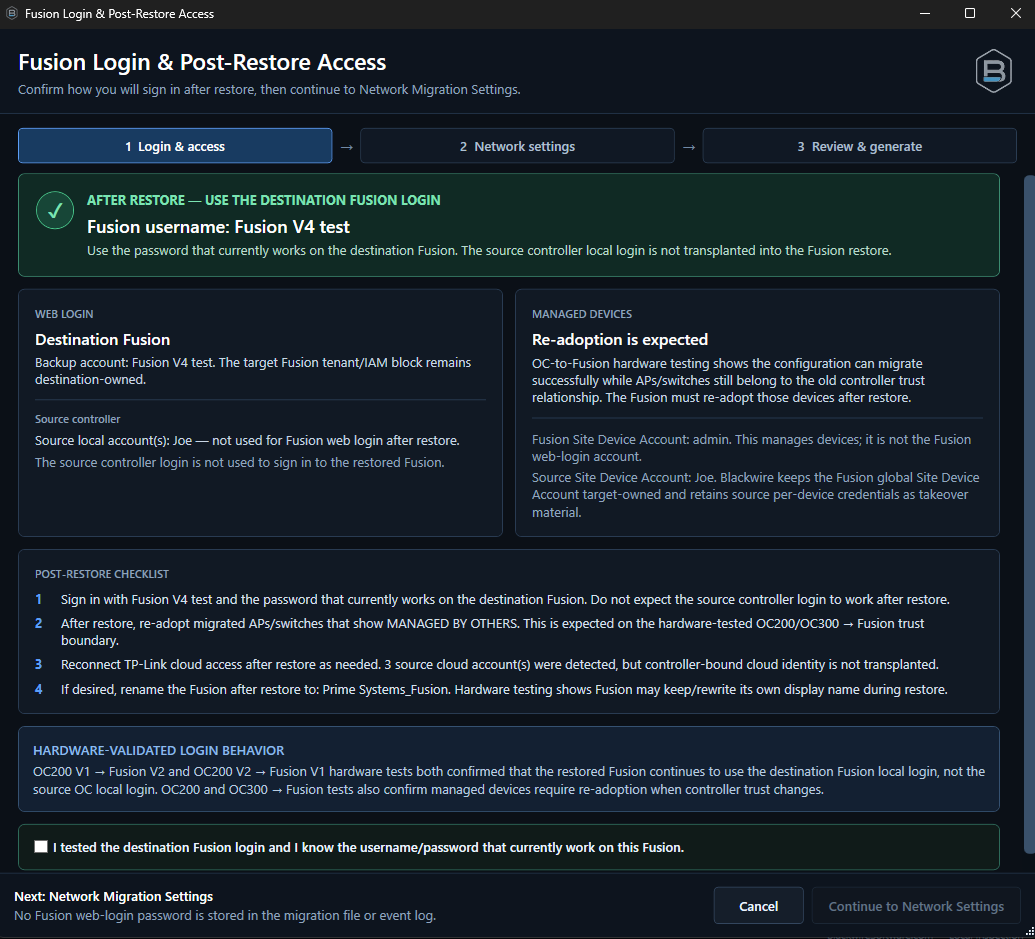
Blackwire Omada Recovery Migrator Login and Post-Restore Access recovery step showing destination Fusion login guidance and post-restore checklist
Login & Post-Restore Access — Before building the recovery restore, confirm the login that belongs to the replacement Fusion and review the post-restore work that will still remain.

Generate workflow

Three checks before the recovery restore is saved.

The generation flow is built around problems that matter when rebuilding from backups: post-restore access, network staging, and the exact final artifact that will be applied to the replacement Fusion.

Step 1

Login & Post-Restore Access

Confirm how the replacement Fusion will be accessed after restore and verify the target-owned login before continuing.

Step 2

Network Migration Settings

Preserve the recovered addressing by default or intentionally stage temporary LAN, DHCP, or WAN settings when rebuilding around an existing live network.

Step 3

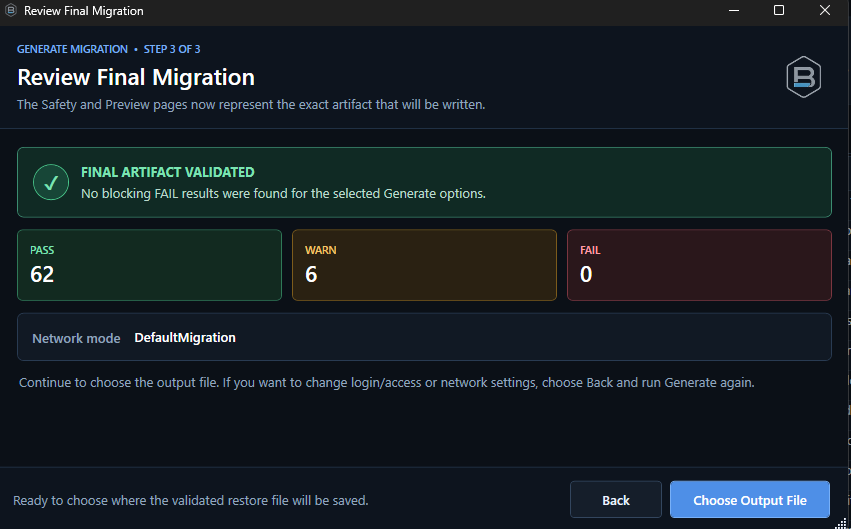
Review Final Recovery

Review the exact destination-specific artifact and its PASS, WARN, and FAIL results before choosing where the restore file will be saved.

Final check

Choose the output only after validation.

The current flow keeps the final safety result visible until the technician explicitly moves on to save the generated restore.
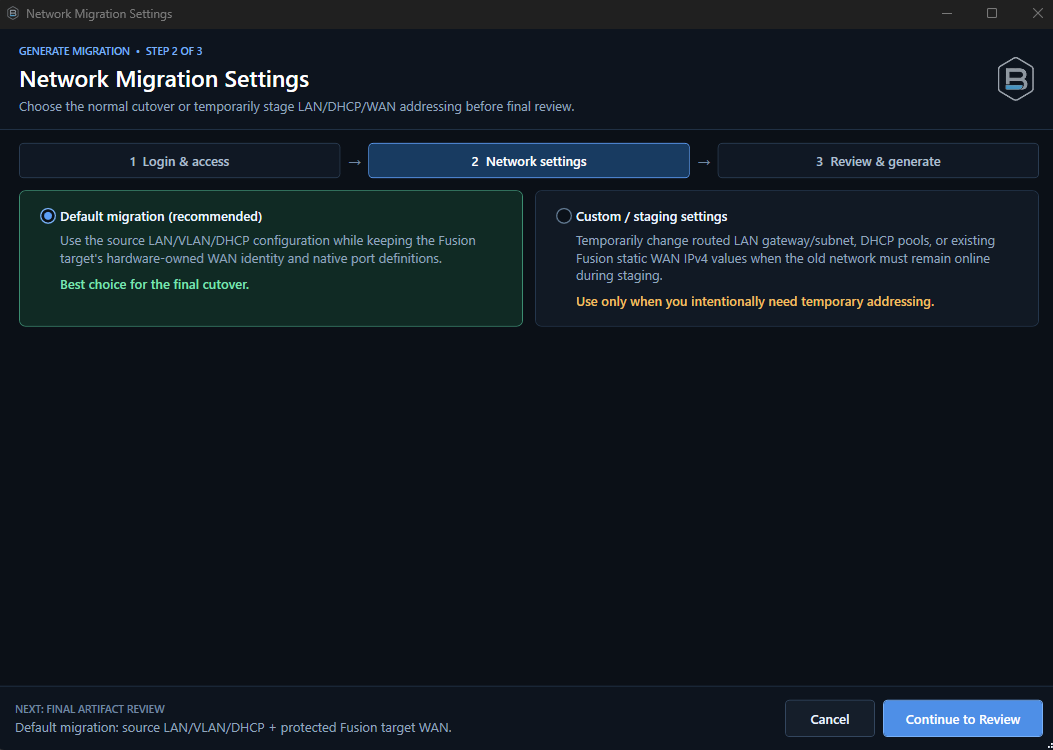
Blackwire Omada Recovery Migrator Network Migration Settings showing recovered network preservation and temporary staging choices
Step 2 — Network Migration Settings — Keep the recovered addressing for the final rebuild or deliberately stage temporary network values when the replacement Fusion needs to be tested beside a live environment.
Blackwire Omada Recovery Migrator Review Final Recovery showing PASS WARN and FAIL totals before choosing the destination-specific restore output
Step 3 — Review Final Recovery — Validate the exact artifact that will be used on the replacement Fusion before choosing where to save it.
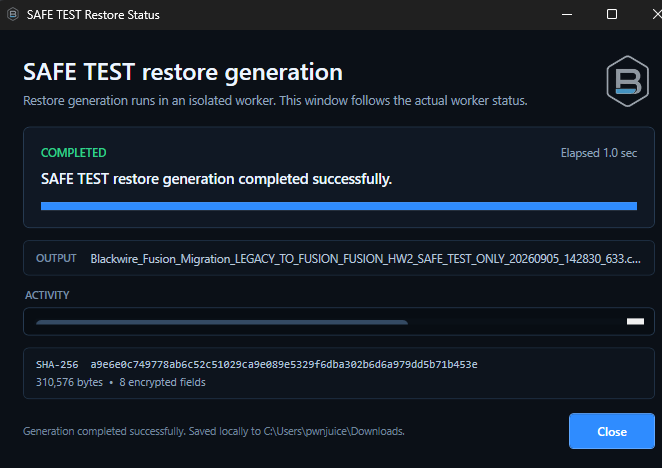
Blackwire Omada Recovery Migrator recovery restore generation status showing successful destination-specific output creation and verification
Recovery restore generation — After final review, the destination-specific restore is created and the technician gets a clear result showing where it was saved and whether the expected checks passed.

Safety and validation

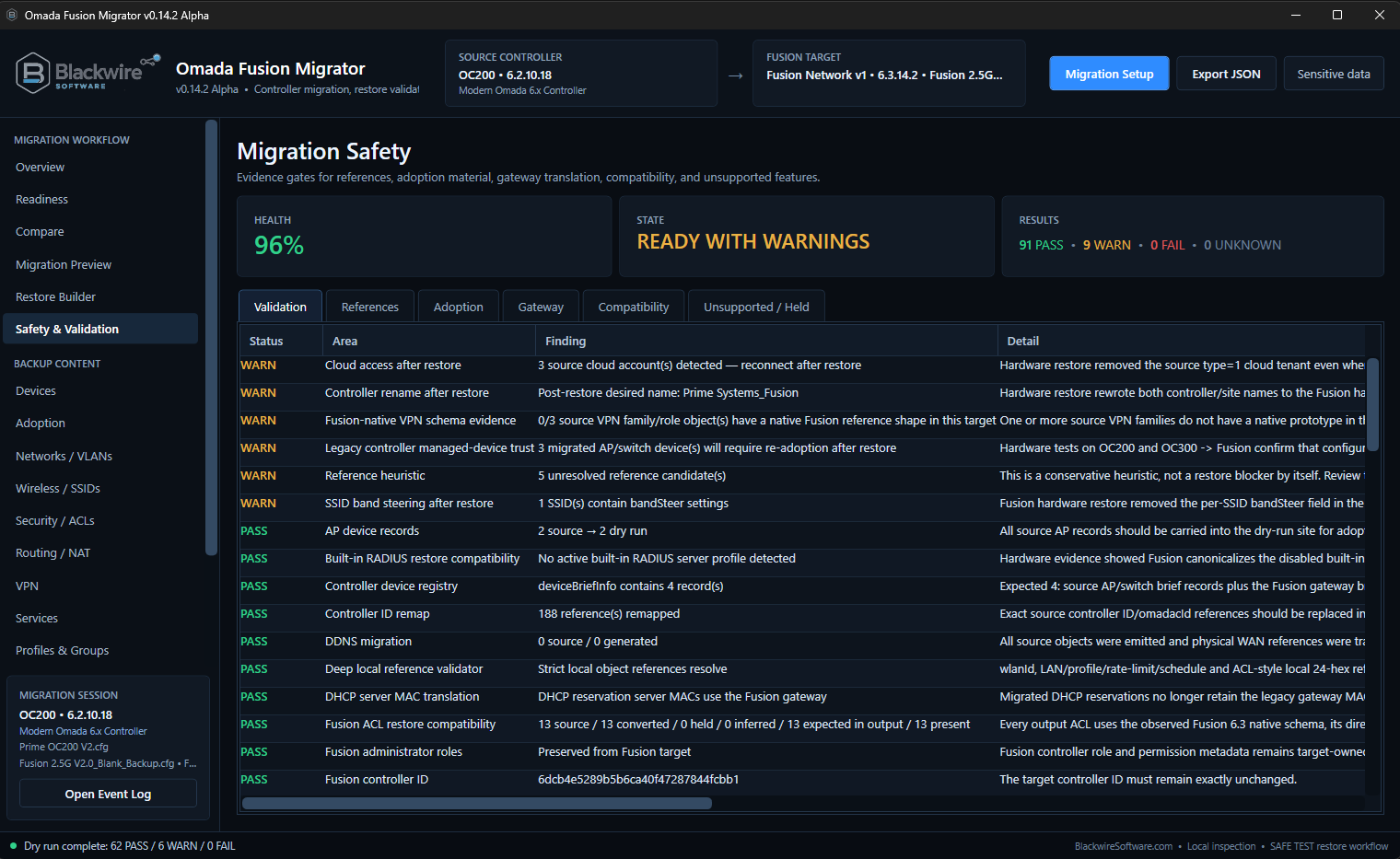
PASS, WARN, and FAIL follow the recovery all the way to generation.

Recovery from a backup should not mean blindly forcing old configuration onto new hardware. The goal is to stop or flag the job when Blackwire sees something that should not be carried forward without review.
PASSThe tested part of the recovery has no blocking issue detected.
WARNSomething deserves technician attention or post-restore verification.
FAILBlackwire found something that should stop generation or restore until it is addressed.
  • Exact source-backup and destination-backup verification
  • Destination hardware-family checks
  • Destination-owned identity protection
  • Recovered reference validation
  • Stronger ACL and VPN compatibility blocking
  • Final-artifact validation
  • Final recovery review before choosing the output file
  • Protection against silently dropping unsupported configuration
Blackwire Omada Recovery Migrator Recovery Safety validation screen showing recovery health, warnings, and blocking issues before restore
Recovery Safety — Problems found in the saved source or its destination-specific translation stay visible before restore. A warning is not hidden just because most of the job passes, and a blocking failure is meant to stop the recovery.

Native Device Takeover

Recovery continues after the configuration is restored.

When the old controller is gone, a successful configuration restore can still leave APs and switches trusting the controller that used to manage them.

FUSION → FUSION PROOF TESTEDTest devices were detected, checked, and moved through the native Omada adoption process into configuring/connected state.
OC → FUSION VALIDATION NEXTThe same hardware behavior has now been observed on OC200, OC220, and OC300 recoveries, but automated OC→Fusion takeover still needs its dedicated physical validation.
MULTI-DEVICE WORKFLOWDevelopment is also covering multi-device takeover so technicians do not have to process every AP and switch one at a time.

What we're still testing

Recovery compatibility is being expanded without pretending every backup is ready.

Some of the remaining work is about additional controller and firmware combinations; some is about edge cases that show up specifically because the source controller is unavailable or the replacement hardware differs from the source.

  • Automated native OC→Fusion managed-device takeover
  • Additional OC200 hardware and firmware combinations
  • Additional OC220 firmware and configuration combinations
  • Additional OC300 → Fusion scenarios
  • Fusion V2 → Fusion V1
  • Downgrade and cross-version compatibility
  • Unusual WAN and Multi-WAN layouts
  • WAN-bound bandwidth-control rules
  • Static-routing edge cases
  • 1:1 NAT
  • Disable NAT
  • Additional VPN combinations
  • ACL and security rules without a proven destination representation
  • Controller-specific services
  • Larger environments and larger managed-device counts
When the destination cannot safely represent something recovered from the source backup, the intended behavior is to warn, hold, or block it rather than silently drop it.

Backup and file access

Local files and the file-server workflows technicians already use.

A recovery job often starts with whatever backup is still available, not with a controller that is sitting online waiting for a migration request.

The current Alpha supports local files plus FTP, FTPS, SFTP, and SCP. Secure connection work has also been hardened around certificate and host verification during development.

Local filesFTPFTPSSFTPSCP

Current build screenshots

The screenshots on this page are from the current Late Alpha test build.

They show the offline/recovery workflow as it exists during active hardware testing. Labels, validation results, test environment names, and individual screens may still change before Beta.

Who this is for

  • IT technicians recovering an Omada environment from backup
  • MSPs taking over a network where the old controller is unavailable
  • Network administrators replacing failed or retired controller hardware
  • Experienced Omada users dealing with unsupported or incomplete native migration paths
  • Businesses moving recovered controller configuration onto Fusion hardware

What the screenshots represent

These are development captures from real test recoveries and migrations. They show the current review, validation, generation, and post-restore workflow rather than polished release artwork.

The captions explain each screen from the technician's point of view without documenting the internal migration engine.

Development preview shown. Interface wording, compatibility rules, test data, and workflow details may change before Beta testing begins.

Late Alpha — Preparing for Beta Testing

The next stage is broader recovery testing, not a release announcement.

The project has gone through major workflow, compatibility, validation, and UI work. Real hardware restore testing is producing repeatable results across OC200, OC220, OC300, both Fusion 2.5G hardware families, and Fusion-to-Fusion recovery/migration.

The next development stage is broader Beta testing with more real-world backups, failed-controller replacement cases, inherited networks, controller/Fusion combinations, and post-restore device scenarios.

Beta has not started yet. There is no public download, pricing, checkout, or announced release date.

Apply to Beta TestLate Alpha / In Progress